Repository navigation

Replies: 20 comments 31 replies

|
A quick look at this Micro Web Browser shows definite potential for ELKS, as it's built for 16-bit real mode and already uses the OpenWatcom C compiler. So getting it running isn't necessarily a huge amount of work, except for the TCP portion. Getting the project compiled will still need conversion from mTCP, a DOS TCP/IP implementation (different from Watcom's TCP/IP), and that could be a lot of work, but not sure, I have never looked into that. The other major issue is the browser only supports HTTP connections, not HTTPS. These days, I believe there are very very few non-secure websites out there, so the entire project might have very limited usefulness from what any user might naturally expect. Another severe limitation is support for GIF images only, neither PNG nor JPG will display. |

|
The problem with HTTPS is well known indeed. So people do a special proxy for example between a retro browser and the real website. The proxy does the job of providing each website as http instead of https. The are other hacks where the browser actually presents screenshots and calculates where you click with the mouse, then this click on the image is send as a real click to a real browser and the result is sent back again to the retro bowser. So you have some kind of (slow) refresh rate, but ... you get HTML5 (slow one)! Actually I am sure there are more hacks on the internet, I just do not remember all of them. https://computernewb.com/wiki/How_to_browse_the_web_on_very_old_computers |

|
Considering Arachne is also a possibility, here is the link of a discussion about its port to ELKS: |
|
If we port MicroWeb, may be we use Nano-X instead of directly accessing graphics adapter, keyboard and mouse? ps: I'm not working on it, it is just a 2025 project TODO. I'd prolly need lots of help with the networking part. |

No, the way Nano-X works is very different - no direct drawing to hardware is allowed, all graphics have to use the Nano-X client API, which are effectively "draw commands" rather than VGA hardware instructions. This would require a rewrite of all MicroWeb graphics. Regarding keyboard and mouse, I wrote examples/events.c and mouse.c to handle mouse and keyboard event loops, along with evtest.c to show how to use it. This small code has no other dependencies so would be easy to integrate into other projects. |

|
The idea for a re-write of the graphic routines - It would be nice to be able to have the browser and a nxterm opened inside Nano-X, for example. |

|
I tested a bit. With two nxterm opened it is already impossible to edit a text file. In the second nx term I try to edit a file and it prints out of memory error for both edit and vi. So ... there will be no memory left for a browser and nxterm in my opinion. |
I completely agree. Memory is extremely right when running a single shell, Nano-X, nxterm and then vi. On the first port of the modern Nano-X even those three couldn't run together. I'm still working on lowering the sizes of each, but we're now going to be looking at 10-20k reductions, not much more.
Lots and lots of work to get anything like that working, as well as adding swap. I wouldn't think of adding such complexity unless people really started to use ELKS and Nano-X a lot more than now. I've previously thought a lot about adding task swapping to ELKS, and it involves lots of changes, making everything larger for that feature, and then still not much benefit without rewriting the applications. One reason for this is that there is no MMU so the hardware can't tell the OS to "swap in" a page fault when the app needs it - the app must be completely rewritten around bank switching, swapping, etc. The other huge problem is that without an MMU, the application has to be swapped back in to the exact same memory address it originally ran in - very problematic if there are other applications running at that address. It's a huge mess with lots of issues and little benefit, IMO. |
|
I think a good starting point is https://github.com/ghaerr/elks/blob/master/elkscmd/inet/httpd/httpd.c The idea is to check how the |
|
Sorry. I was searching for wget tool in ELKS. Is there wget? |
Nope. It might be nice to have something like that, to enable grabbing a kernel update or whatever. Of course, actually using the real wget will never work - it's a GNU project, so that means its a total pig, with hopelessly too many source files and RAM usage, not to mention the ridiculous autogen/configure stuff, before even starting a port. Whether we're talking wget or a browser, IMO the solution for ELKS is to think and search for things that are very, very small and designed for very little memory usage and/or embedded systems. |
|
It is actually urlget: https://github.com/ghaerr/elks/tree/master/elkscmd/inet/urlget |
Yes, it might be. I've never used it, perhaps play with it and see how it works. The source says it supports FTP and HTTP. |
|
@ghaerr Is it actually possible to compile the code of MicroWeb which in C++ with OWC for ELKS? |
|
Thanks @toncho11. As expected, the code seems very familiar, it is as in Linux as far as I could read. Unless mTCP does crazy stuff, the network port would be smooth I think. I wonder if there was any recent change in ELKS network code, or all that SO_LINGERing option is still something needed. |
|
You can use QEMU with network enabled.
This is the network documentation: https://github.com/ghaerr/elks/wiki#Networking Supported cards are: ne1k, ne2k [ne0], wd8003, wd8013 [wd0] and 3c509 [3c0], so your ne2000 should work. |
Thanks @toncho11. I can confirm httpget is working as expected here in qemu, and is able to retrieve html content to stdout. |
The ELKS networking API is based on early Linux, and is basically BSD sockets with modifications.
It would be a good idea to look and see whether mTCP uses BSD sockets or uses a different API. If not sockets, it could be hard to port. @jhhoward did mention that MicroWeb has a Windows version that uses Winsock; Winsock is pretty close to BSD sockets so that would indeed be a good place to start, if Winsock is currently working on MicroWeb.
Unfortunately, the ELKS TCP/IP implementation is complicated, and not fully implemented to spec. Linger is needed in various network daemons and there are also issues with local address reuse with bind and accept, especially when accepting on the same local address repeatedly and reusing sockets within ktcp. The TCP/IP implementation isn't in the kernel, but implemented as a user program Finally, some BSD functionality was too complicated to implement to spec, and the associated routines, like |
|
Here is a mTCP auto generated sample for retrieving a page for comparison httpget: |
|
I started a discussion about the MicroWeb ELKS port here: jhhoward/MicroWeb#40 |
|
While not a graphical browser, bobcat could, with some effort (it is Turbo C, uses PDCurses, etc) be ported to ELKS: ps: Interesting discussion from 1997 mentioning ELKS: https://lists.nongnu.org/archive/html/lynx-dev/1997-03/msg00426.html |
|
I like this from the changelog of bobcat: : ) |
|
Interesting discussion about adding support for 4-bit and 8-bit colors to arachne SVGALib port: This would be useful in an eventual future ELKS port. |
|
I think if we could have directly a graphical browser like Arachne, which does support in its architecture the use of extended memory, it would be wonderful. |

|
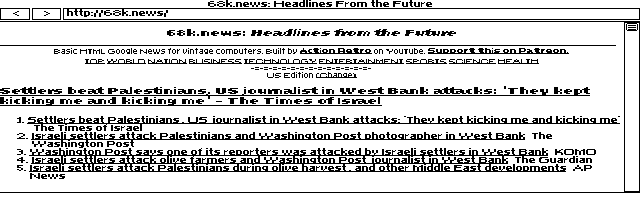
This issue inspired me to start looking into a web browser for ELKS and, with the help of some coding apps, I came up with this beta: ELKSWeb 0.1. It takes inspiration from MicroWeb, but is written in C using the native ELKS toolchain, with 8088-compatible machines in mind. For networking, it uses ELKS's own I have been trying it out on my HP 200LX systems as well as in emulators, and it has been fun seeing pages like 68k.news running on them. It is still an early beta, with plenty of limitations, but basic HTTP browsing and GIF images are working. Here is 68k.news in ELKSWeb 0.1, captured in QEMU:
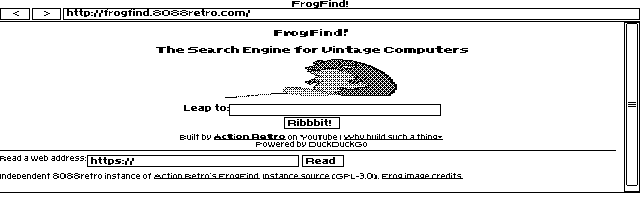
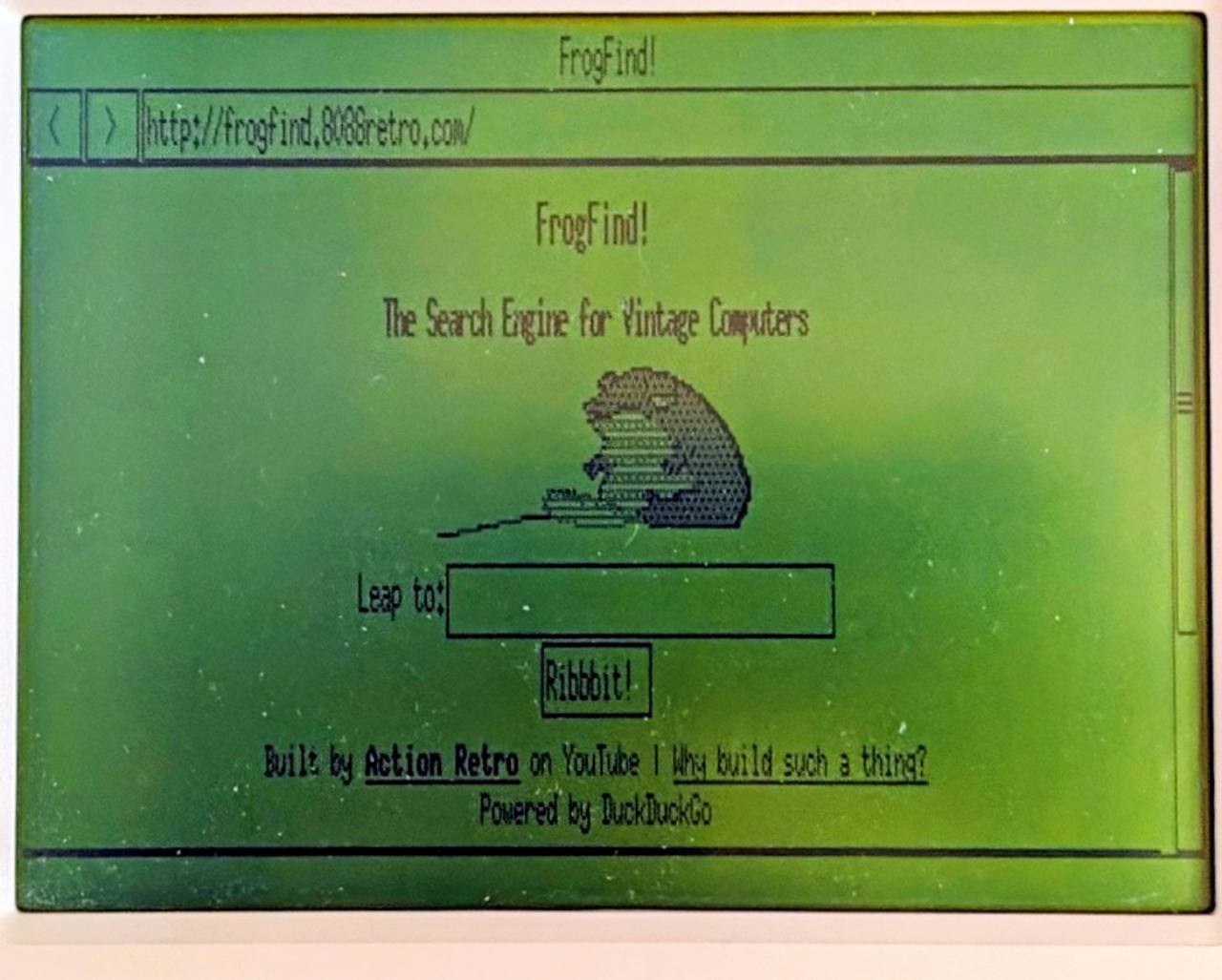
Here is my FrogFind mirror in ELKSWeb 0.1, showing the homepage with its frog GIF. This was captured in QEMU.
The downloads, installation instructions, known limitations and more technical details are on GitHub: ELKSWeb. I would really welcome testers and feedback, along with any feature requests. I will not promise every idea will be feasible given the memory, hardware and other limitations we are working with, but I would love to hear what people would find useful. |
|
Hello @l00nix, Wow, this is very cool! I see you're supporting CGA, EGA and VGA which is very nice. Can't wait to try it. Are you aware of our new capability of an ELKS build performing compilation of external repos and including them on our larger HD-based distribution? The Thank you! |

|
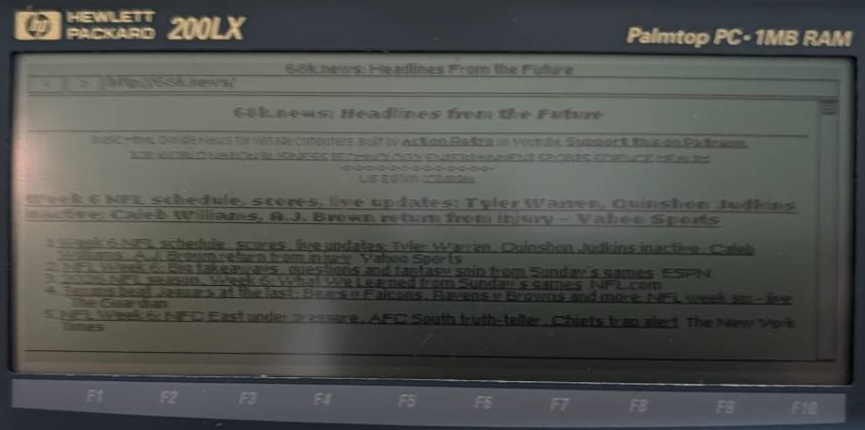
Hi @ghaerr, Thank you! I was not aware that the ELKS build system could compile external repositories and include their applications in the larger disk images. I am definitely interested in contributing my ELKSWeb beta through this system. Guidance on the expected build/install targets, or a suitable existing application to use as a reference, would be appreciated. Since my earlier comment, I have successfully tested live Internet access on a real double-speed HP 200LX, using an NE2000-compatible Accton EN2216 PCMCIA Ethernet card and the native ELKS
This test used an experimental HP-specific ELKS build with local NIC fixes. DNS resolution and a LAN HTTP download with a matching checksum also passed. There is still work to do. The roughly 92 KB 68k.news page took quite a while to finish parsing and laying out after downloading. Broader navigation and form submission testing remain on the list. I am also planning to test ELKSWeb on my Amstrad PPC 512 in the coming days and will share the results. I am very happy that I was able to get this to work on real hardware. Making the beta easier for other ELKS users to build and try sounds like a great next step. Is there an ELKS development Discord server where contributors and testers can discuss development and share results? |
No, but feel free to discuss here or open another particular issue.
The current target(s) are really just the IBM PC and compatibles at this time (but also useful for QEMU and other PC emulators). Take a quick look at For instance, here's the function that builds Microwindows/Nano-X: In general, the function clones or pulls the latest source into the ELKS/extapps/ directory, then uses a Makefile.elks to clean and build the repo locally. I see you're using a shell script rather than a Makefile, which is fine. I would advise using a slightly modified build from your existing script, with as few external dependencies as possible (e.g. perhaps not using sha256sum or python3 if possible, as these may not be installed on macOS or other non-Linux systems). If you're using After building, the elkscmd/ExtApplications file is used to automatically copy images from the ELKS/elksapp/ directory over to the distribution media. You'll just add one line per file for each installed file. Here's an example of the ExtApplications entries for the Microwindows/Nano-X install: Note the "::' mechanism denotes a file rename, and ":1440k" are the minimum disk image size. Leave this blank for larger programs like the web browser, and it'll get installed on HD images only, as it likely won't fit on the almost-full floppies. |

|
ai did all that? that is so cool! |
|
agreed ;-) let me know if there is anything I need to be aware of regarding the external repository compile. |
|
Hello @l00nix, I have played around a bit with your cool ELKSWeb browser, contributed as an external repo build in #2837. I must say, very cool, and it actually works! :) I have a couple thoughts on how the ELKS user experience might be improved. Feel free to use or ignore these ideas, I'm available to help explain more if you'd like. I was testing using QEMU under both VGA and EGA display modes.
By default, the Nano-X mouse is /dev/ttyS0 on real hardware, but /dev/ttyS1 on QEMU. Either is overwritten by MOUSE_PORT= env var. The The C library dprintf code is here. The The Nano-X mouse driver is here. Look at the The non-Nano-X mouse driver for ELKS GUI programs is here. The relevant function is Using some of the above would help compatibility with other ELKS graphics programs without the user requiring any reconfiguration.
Overall first impression is this is quite an accomplishment! I look forward to playing with this further as I learn how to get the mouse to work in QEMU. Thank you! |
|
Hello @ghaerr, Thank you for trying ELKSWeb and for the detailed feedback and code references. This is still a very early draft beta. So far, real-hardware testing has been limited to the HP 200LX; other validation has been in emulators. You are the first person to provide independent user feedback, so your observations are particularly helpful. I will review each of the points you raised: mouse configuration compatibility with existing ELKS applications, the duplicate startup refresh, the redraw when navigating to a new address, and font legibility in EGA and VGA. Following the established mouse and debug-port conventions makes sense, and the examples you linked give me a useful starting point. I also agree that legibility matters more than faithfully distinguishing regular and bold text. I will investigate the suggested fonts while keeping the browser’s tight code and memory limits in mind. I am preparing to test on an Amstrad PPC 512 as well, although that hardware testing has not happened yet. Thank you again for taking the time to test it and help improve it! Stay tuned! Thanks |
|
One more usability issue I found: when entering address URL, perhaps consider rewriting input string with prefix http:// if input string does not already contain "://" or start with "/". This would essentially allow internet URLs to be the default, rather than having to add http:// manually to URLs, as this is very common usage. |

|
I haven't had as much success as @ghaerr. When I type an address into the address bar (e.g frogfind.de) the intro page just blinks and redisplays. It doesn't look like it's trying to connect to the site. If I select the frogFind tab and press enter the lower left hand corner shows host name not found. I am running qemu on m1 MacBook Air |
|
Hey, Thanks for testing. I assume you tested connectivity to the Internet. Can you try http://frogfind.8088retro.com/ if that comes up? Thanks Alex |

|
I'm an idiot. Forgot net start. Both your link and the tab work for me now. |
|
That's great!
Thanks for the update
Alex
…On Tue, Oct 20, 2026, 10:33 p.m. djohanse ***@***.***> wrote:
I'm an idiot. Forgot net start. Both your link and the tab work for me now.
—
Reply to this email directly, view it on GitHub
<#2185?email_source=notifications&email_token=ABBP33EYTALWVMSSCJBFHAL5VAOBDA5CNFSNUABIM5UWIORPF5TWS5BNNB2WEL2ENFZWG5LTONUW63SDN5WW2ZLOOQXTCOJQHA3DSMZUUZZGKYLTN5XKO3LFNZ2GS33OUVSXMZLOOSWGM33PORSXEX3DNRUWG2Y#discussioncomment-19086934>,
or unsubscribe
<https://github.com/notifications/unsubscribe-auth/ABBP33CUVPY57SEMFAVWWQ35VAOBDAVCNFSNUABGKJSXA33TNF2G64TZHMYTINBRGE3TGMJ3IRUXGY3VONZWS33OHM3TQMRVGM2TFILWAI>
.
You are receiving this because you were mentioned.Message ID:
***@***.***>
|

|
@l00nix, this is really impressive. Other than the issues mentioned above, ELKSWeb running on my Compaq Portable Plus (8088, 4.77 MHz) loads HTTPedia (an HTTP Wikipedia proxy) homepage in a blazing 11 seconds, and takes an additional 30 seconds to receive and draw the logo. Compared to MicroWeb which loads in 8.5 seconds and images in an additional 10 seconds, I think you're on the right track. An optimization I noticed that MicroWeb does is by not redrawing the entire site when images load, but only rewriting image placeholders with the image itself. Also CGA mode functions fantastic on the Compaq which is known for having quirks with its dual-mode MDA+CGA video card, other than the font legibility which was also mentioned above I believe. The only other issue I didn't see mentioned was that it redraws the site when moving the selection via Keep up the work! I'd be happy to help test and/or contribute. |
|
Thanks for the valuable feedback and happy to hear all the amazing retro hardware ELKS Linux is running on and ELKSweb is being tested on. I will add your feedback to the list of things to work on in the next beta cycle. Thanks again Alex |
|
I have released ELKSWeb 0.2 — experimental beta. Thank you to @ghaerr, @sammothxc and @djohanse for the testing and feedback. This release includes:
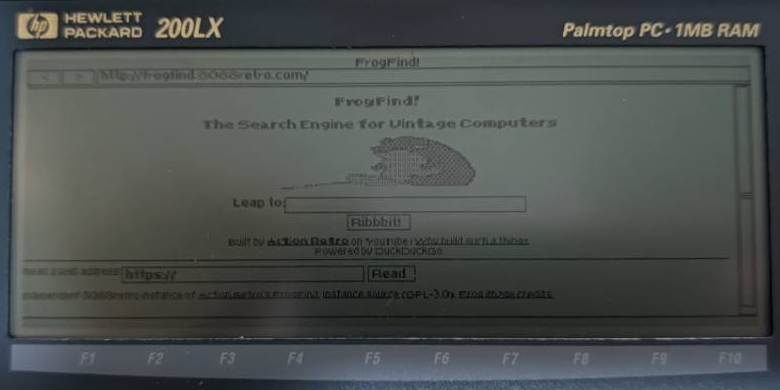
I have also been testing on an Amstrad PPC 512 with PicoMEM 2, using its original LCD and serial mice. Here is FrogFind during that testing:
The release provides the standalone This is still an early beta. Large-page loading needs more work, the earlier 86Box cold-boot exit issue remains unresolved, and broader hardware feedback is welcome. The newly versioned release passed automated and QEMU checks; the PPC observations above came from development candidates. Full changelog and feedback credits Stay tuned! Thanks, |
|
Hi @ghaerr, I have made ELKSWeb 0.3-dev1 available as a development prerelease for testing. It includes the pending URL display and startup Backspace changes you suggested, plus the guarded graphics-console fallback described above. The For the console issue, could you compare both executables using the same disk image and login method with Automated checks and the QEMU tests passed, but your exact Thanks, |
|
Hi @l00nix, Thanks for your continued testing. Things are quite strange here. In trying again, now I happened to have taken a screenshot earlier when the error was displayed (now, I can't get this to repeat): And here's the result of your requests for 
Yes. It is quite strange that with no changes, now (2+ hours later) the same script now works, and I can't get it to repeat. Sounds like an uninitialized variable, except that shouldn't affect anything given my tests are directly after QEMU boots. Could be something to do with clock time? I will continue to investigate. Thank you! |

I got it to repeat, but only once, and strangely: upon attempting to run More testing coming. |
|
Hi @ghaerr, Thanks for checking and sharing the screenshots. One difference caught my attention: the failed 0.2 run follows Could you try launching ELKSWeb before and after This does not establish networking as the cause, but it gives us a concrete difference to test before pursuing clock time or uninitialized state. The 0.3-dev1 candidate is also available for comparison, although I am keeping this issue open until the original failure is understood. Thanks, |
Tried that, doesn't make any difference. Currently trying to get this to repeat again and cannot! Also, the 2nd screen shot above was taken from a separate QEMU session.
Looking at your source shows nothing strange, other than the possibility of ELKS not handling /dev/tty properly: Further, looking at the kernel tty_open routine: The The The first if statement should return Finally, in the I notice that determine_tty could return NULL, but a NULL value isn't checked in the TCGETS case, which is used by I'm leaning towards the thought this is an ELKS kernel bug, in using /dev/tty, rather than /dev/console, for getting the console keyboard for read/write. There is some confusion in ELKSWeb regarding using file descriptor 0 in getting the video mode, but then opening /dev/tty for the console for the keyboard used in graphical mode. The fix is probably to use open("/dev/console".... But I would like to add some debug kernel code to try to get this to replicate and track down what's actually happening. In conclusion, I don't think this an ELKSWeb issue, but after figuring out what's happening, probably should use /dev/console to get the console keyboard, which also guarantees a full open to the lower level (serial or console) sub-driver. Will report more tomorrow. Thank you! |
|
I have released ELKSWeb 0.3 beta. This update includes changes addressing @ghaerr’s URL-display, display-selector and console feedback: the requested URL stays visible while loading, Backspace works in the display selector, and a guarded console fallback has been added. The intermittent console issue remains under investigation. I tested the 0.3-dev1 candidate on the PPC 512 and HP 200LX DS, including browsing, GIF rendering and serial-mouse input. The release includes the updated welcome page and separate executable, runtime and source downloads. Thank you for the suggestions and testing. I am waiting for further feedback and @ghaerr’s testing to guide future updates. Thanks, |


Uh oh!
There was an error while loading. Please reload this page.
I found this project on github, any use to elks?
https://github.com/jhhoward/MicroWeb
All reactions