


Note
Open Game Master was called Open Dungeon Master until October 2026. Installed apps update in place and keep their servers, sign-ins and worlds; the name, the website (opengamemaster.com), this repository and the release file names moved. A flatpak installed before the rename has an id of its own: it offers the renamed app as its next update and moves its data into it.
Important
The main codebase is Lebbitheplow/open-game-master. The game itself (rules engines, the AI Game Master, the game screens and the server) lives there, and so do most issues and contributions. This repository only packages that server into the desktop and Android apps. If you are looking to run a server, change how the game plays, or report a bug at the table, start there.
These are the desktop and Android apps for Open Game Master, the multiplayer D&D 5e table with an AI (or human) Game Master. Every app carries a complete Open Game Master server inside it, so you do not need a server to play: install the app, open your world, and share a room code with your friends. When you do have a server, the app connects to it (or to any number of them) as well.
The rules engines, the AI Game Master and the game screens all come from the server repository; this repository is the shell around them. It runs the bundled server on your machine or phone, opens a public address for it when you share, runs the AI Game Master on whatever you already have (a local model it installs for you, an API key, or a CLI agent subscription like Codex or Grok Build, which also paint the scene art), and draws the game screens natively for whichever host you play on.
Tip
New here? Start with the knowledge base. It covers which setup fits your table, the system requirements, installing on each platform, hosting and joining, playing, leading a table, Story AI and every setting, and it is checked against each release. This README is the reference for building and packaging the apps.
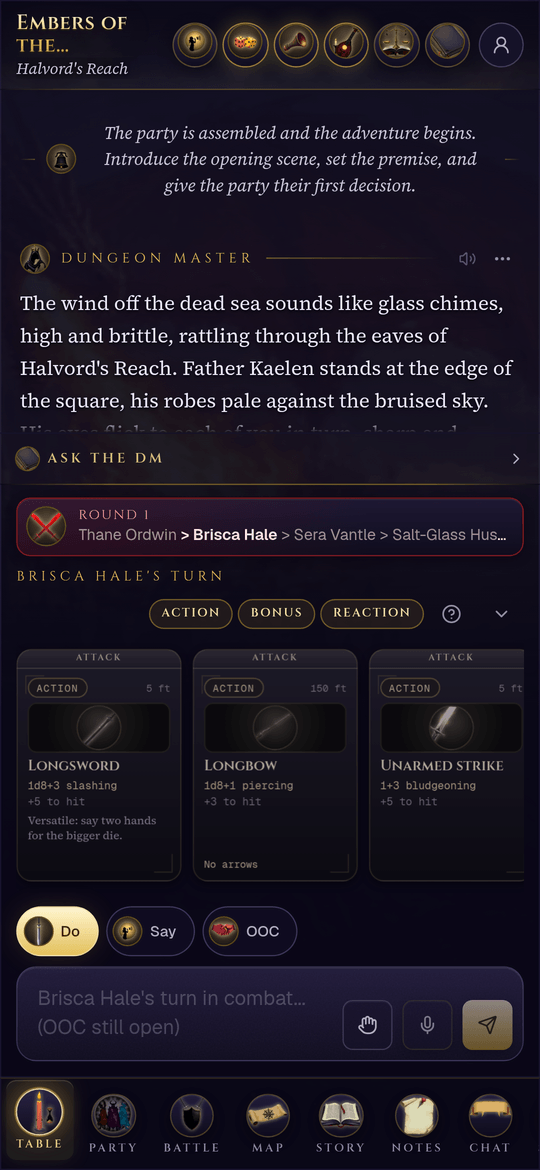
A live table on a phone. The Android app hosts that world itself.
The latest stable release is on the Releases page. Every build ships first as a beta (marked Pre-release there) and is promoted to stable unchanged once it holds up; the desktop app offers the betas too with App settings > This app > Beta updates. To download the current beta, use the beta channel on opengamemaster.com: it lists every file of the newest pre-release while one is newer than the stable release, and says when there is none. How the channels work: releases.md. More help lives in the knowledge base: installing on Windows, macOS, Linux and Android, and desktop troubleshooting.
| Platform | File | Notes |
|---|---|---|
| Windows (x64) | Open-Game-Master-Setup-<version>.exe |
Installer; updates itself. Not code signed: when SmartScreen says "Windows protected your PC", choose More info, then Run anyway. |
| macOS (Apple Silicon) | open-game-master-client-<version>-arm64-mac.dmg |
Not notarized yet: the first time macOS blocks it, open System Settings > Privacy & Security and choose Open Anyway (on macOS 14 and earlier, right-click the app and choose Open). |
| macOS (Intel) | open-game-master-client-<version>-x64-mac.dmg |
Same as above. |
| Linux (x64) | .AppImage, .deb, .rpm, .tar.gz, .flatpak |
The AppImage carries a static runtime, so it runs on distros that no longer ship libfuse2. |
| Android 8.0+ (arm64) | open-game-master-client-<version>.apk |
Sideload it: allow installs from your browser or file manager when Android asks. |
What your machine needs. The app wants 4 GB of memory (8 GB recommended); measured on Linux it uses about 1.2 GB with its world open, and the installer is close to 200 MB. A person, an OpenAI key or an agent program telling the story needs nothing more. A local model needs at least 16 GB of graphics memory, and runs on Windows x64, Linux x64 and Apple Silicon only (not Intel Macs, ARM PCs, the Flatpak or Android). Local pictures need 8 GB of graphics memory. Every setup, with the machines it was measured on and what hosting a group needs: System requirements.
Checking a download. The release page lists a SHA-256 checksum beside every
file; compare it with sha256sum <file> (or Get-FileHash <file> in PowerShell).
Releases after 0.17.6 also carry a build attestation, which proves a file came out
of this repository's release workflow:
gh attestation verify <file> --repo Lebbitheplow/open-game-master-client.
 A world on your device The app runs its own Open Game Master server: enter your world from the title screen and it wakes up, close the app and it sleeps. Campaigns, characters and pictures stay on your computer or phone. No account anywhere else. |
 Share it with one code Open a campaign lobby and the app opens a public address for your world through a Cloudflare tunnel, with no port forwarding and no router setup. Friends join with the room code, an invite link, or a QR code. For a table in the same room, share on this Wi-Fi instead and play with no internet at all. |
 Any server, one app Add servers by address and the app remembers each session. A room code finds its table wherever the host is sharing from, even though the host's address changes every time, and odm:// invite links open straight into the app.
|
 Native game screens The app ships the game's own screens and draws them itself; only game data travels to the host. The controls match everywhere, and a shared world costs far less traffic. Much older hosts open their own pages instead. |
 Story AI, your choice Decide who narrates your world: a human at the table, an AI Game Master on your own OpenAI API key, or, on desktop, a CLI agent you already pay for (Codex or Grok Build, which paint the pictures too, Claude Code or opencode) narrating on its own subscription, or a local model the app sizes to your hardware, downloads and runs for you: gpt-oss-20b on a 16 GB gaming card. |
 Local scene art Portraits, scene art and location maps from the Codex or Grok Build agent that narrates, your OpenAI key, or, on desktop, a local ComfyUI the app installs with one curated SDXL checkpoint. Text and image stacks install and uninstall separately. |
|
Dice, voice and devices Pixels Bluetooth dice pair on desktop and Android alike, the 3D dice tray rolls in the app, and App settings holds the microphone, playback device and every volume, reachable over any running table. |
 One home, and a guided first launch The app's home is your world's home: the table you were last at fills the screen with its latest scene and a "when last we left" recap, and your other tables sit as save slots grouped by host. A first launch asks your name, who tells the story and how it sounds, and a three-step tour points out the ways in. |
Every build carries the Open Game Master server, built from the server repository at release time, and runs it privately on your device:
- Desktop starts it as a child process from the app's data folder the first time you enter your world. The first launch asks for a name and signs you in (there is no password to remember on your own world), then who tells the story and what reads it aloud.
- Android runs the same server on a Node 24 runtime built for Android, with the phone's built-in SQLite engine. A foreground notification shows while the world is shared, and Stop hosting in that notification ends the share.
Your world stays offline until you share it. Opening a campaign lobby starts sharing
automatically: the app asks the Open Game Master broker for a public
play-CODE.opengamemaster.com address, runs cloudflared to it, and hands out a
room code. The code never changes for that table; it only works while you are
sharing. Voice chat relays through Cloudflare TURN, so it works across networks
without opening ports either.
Desktop and Android behave the same way on purpose. The one exception is the AI a computer runs: a local model or a CLI agent is a desktop-only Story AI.
Story AI (on the title screen's menu, in Settings, and in the first launch) decides who narrates the world on your device. The knowledge base walks each door:
- A human Game Master. The app keeps the sheets, dice, maps and record; a person narrates. Works everywhere, no model needed.
- Your own OpenAI API key. The AI Game Master and scene images run on OpenAI, billed to your key.
- A local model (desktop only, and only with at least 16 GB of graphics memory: a 16 GB card, or 24 GB of memory on a Mac). The app scans your GPU and recommends the best storyteller that fits the card whole: gpt-oss-20b (12 GB download) on a 16 GB card, Qwen3.6-35B-A3B at Q3 (17 GB) on a 24 GB card, at Q4 (22 GB) from 32 GB and at Q8 (38 GB) from 48 GB, and on a Mac or another machine whose graphics share one memory, the best that fits the graphics' share. It adds a small Qwen3.5-4B utility model for summaries when that fits on the card too. Below 16 GB it offers none, since no model that small plays the full rules well; use your OpenAI key, an agent, or a human Game Master there. A bigger tier than the card holds can still be picked: it says so, and runs partly from system memory, which makes every turn slower. It downloads a pinned llama.cpp build for the graphics card (CUDA on a recent NVIDIA driver, Vulkan on AMD, Intel or an older NVIDIA driver, both on Windows and Linux x64; Metal on Apple Silicon), writes the preset the AI Game Master was tuned on, and starts and stops the model with your world.
- An agent you already have (desktop only, not the Flatpak build). Codex, Grok Build, Claude Code or opencode, installed and signed in on this computer, narrates on the subscription you already pay for. Codex (a ChatGPT plan such as ChatGPT Plus) and Grok Build (SuperGrok or X Premium+) also paint portraits, scene art and maps once a test picture succeeds, so one subscription covers the whole table; Claude Code and opencode narrate only. No API key changes hands. The program gets none of its own tools, only the table's rules turn by turn, the same as the built-in storyteller.
What reads the story aloud (OpenAI's voices on the saved key, a Kokoro on this computer or your network, or on screen only) and the sound library download are in Settings, Narration and sound.
Scene art on desktop can also come from a local ComfyUI the app installs into its own Python virtual environment with the SDXL base checkpoint: about 15 GB of disk with its Python packages, on Windows or Linux, with Python 3.10 to 3.14 and Git installed first, and 8 GB of graphics memory.
To play with an AI Game Master on someone else's server, connect to a server whose admin has set one up. Tables run by a human Game Master work on every host.
- Add a server by its address. Each server keeps its own accounts, so you sign in or register there once; the app remembers the session.
- Join with a code takes a room code, an invite link, or a scanned QR code (the Android app scans with the camera). The code resolves through the broker to wherever that table's host is sharing from right now, and a code the broker does not know is asked of the servers the app is signed in to.
- Invite links (
odm://join?...) open the app directly on desktop and Android; the web version of the link offers the app or the browser. - Beside every server in the menu you can forget it on this device or delete your account there for good.
When you enter a host running server 0.29.1 or newer, the app draws the game screens itself from the pages it ships, and forwards data calls, live updates, pictures and downloads to the host with your session. Hosts from server 0.16.0 on are loaded through the app's bundled screens as well (Settings has the switch for these older worlds); anything older opens its own web pages inside the app.
The desktop app checks for a new release when it starts and offers to install it. Where it can, it installs the update itself and relaunches:
- Windows installer, AppImage,
.tar.gz, macOS: replaced in place. .deb/.rpm: installed through your package manager, which asks for your password.- Flatpak: the new bundle installs through the system's flatpak (which may ask for your password), or opens in your software center when the app cannot reach it. A release that went out without a Flatpak bundle is not offered to Flatpak installs until one is there.
- Store installs (snap, or pacman through the AUR template in packaging/aur) only announce the new version and leave the upgrade to that store.
On Android, install the new APK over the old one; your world and its data are kept. Android only installs an app over one signed by the same key, and the APK from this page and the Google Play build may not be. If Android refuses to install one over the other, take your world out first with Move your world in Settings, since uninstalling the app deletes it, then bring it into the new install the same way.
An older version may refuse to open a world a newer one has changed the shape of. It says so and leaves the world as it is; update again to open it.
Your world lives in the app's data folder, apart from the program itself, so an update or a reinstall never touches it:
- Windows:
%APPDATA%\open-dungeon-master-client - macOS:
~/Library/Application Support/open-dungeon-master-client - Linux:
~/.config/open-dungeon-master-client(a flatpak keeps it under~/.var/app/com.opengamemaster.client/config/)
The folder keeps its name from before the rename, so every install still finds its data.
- Android: the app's private storage, which uninstalling the app removes.
Inside it, data/ holds the world's database and its key, and local-server/
the server files the app unpacked from its own copy, with your uploads,
paintings, narration and installed world packs beside them. An update replaces
the server files and carries those folders across. Uninstalling the desktop app
leaves the folder where it is.
- Switching Linux packages: the AppImage,
.deb,.rpmand.tar.gzshare that one folder, so moving between them keeps your world. The Flatpak keeps its own, so carry the world across with Move your world in Settings. On a Steam Deck, Game Mode and Desktop Mode run the same Flatpak and see the same world. - On Android the world's database sits in the app's private storage, which Android encrypts along with the phone, but it has no key of its own the way the desktop's does: the phone's built-in SQLite has no cipher. Your sign-ins are sealed with the Android Keystore. Phone backups and transfers to a new phone leave the world out, so the new phone gets your server list and asks you to sign in again; bring the world over with Move your world.
Settings has a Troubleshooting card for the rest, and nothing on it deletes anything you made:
- Check files reads every unpacked server file against the ones the app shipped with and says which are missing or changed.
- Repair unpacks the server files again, keeping your campaigns, pictures and installed worlds, and wakes your world again if it was awake. The app does this once on its own when your world fails to start and the check finds the files damaged; the title screen offers it too when the world will not wake.
- Clear cached files drops what the app cached from servers; sign-ins, saved servers and your world stay.
- Copy summary puts a short report on the clipboard for a bug report:
versions, the state of your world, whether the local story and image AI
are installed and answering (and the last thing that stopped them), and
which server files are wrong. It names no accounts, keys or campaign
text, and shortens paths to
~. - Show logs opens the folder with
local-server.logandtunnel.log. Read a log before sharing it; the world's own output goes there. - Reset the app is the one row that takes your world out of the app's
hands, so it sits last, asks you to type
RESET, and still deletes nothing: the app stops your world, restarts, and on the way back in renames its data folder toopen-dungeon-master-client.set-aside-<date>beside the old place and starts from an empty one. Local AI engines you installed stay. To bring the old world back, close the app, remove the new data folder and rename the set-aside one back; to let it go, remove the set-aside folder yourself. On Android the system's own Clear storage for the app does the same, and that one does delete.
- Node 22+ and npm.
- A checkout of the server repository beside this one, at
../open-game-master(or../open-dungeon-master, a clone from before the rename), with its dependencies installed (npm installthere). The build bundles the server's page components into the app, andbundle-serverbuilds the embedded server from it. Point elsewhere withODM_SERVER_DIR=/path/to/open-game-master.
git clone https://github.com/Lebbitheplow/open-game-master.git
git clone https://github.com/Lebbitheplow/open-game-master-client.git
(cd open-game-master && npm install)

cd open-game-master-client
npm install
npm run bundle-server   # builds vendor/server from a clean worktree at server HEAD
npm start               # builds and launches the desktop app
bundle-server rebuilds better-sqlite3 for Electron's ABI, so rerun it after
changing Electron or the server. vendor/server is a build artifact and never
committed.
npm run lint
npm test                        # builds, then node --test over tests/
npm run smoke-local             # boots the bundled server end to end
npm run smoke-relocate          # the server tree survives a move of the data folder
node scripts/smoke-tunnel.mjs   # a real share through the broker and cloudflared
Every pull request runs .github/workflows/ci.yml: lint, the desktop build and tests, the mobile type check and tests, the main process's file-handling tests on Windows, and the Android unit tests. The smoke runs above are not part of it, so run them before opening a pull request.
The desktop app can run one explicitly registered native board for a local world. This is a development bridge, not an addon installer or a bundled native renderer. Remote servers, browsers and other platforms keep the sandboxed web board. Install and trust the native program yourself before registering it.
Create a local JSON file with the addon's manifest addonId and board view viewId (the id under contributes.boardViews):
{
  "addonId": "sample-board",
  "viewId": "tabletop",
  "root": "C:\\addons\\sample-board",
  "entry": "native\\main.mjs",
  "settings": {}
}
The root must be an absolute directory; entry must be a relative .mjs file that resolves inside it. The registration file is limited to 16 KiB and the settings JSON to 4096 characters. The app reads the file once at startup. For example, in PowerShell:
$env:ODM_NATIVE_BOARD_DEV_CONFIG = 'C:\addons\sample-board\native-registration.json'
npm start
The matching addon and board view must also be installed and offered by the
local world. The native program receives newline-delimited JSON on stdin:
{ "native": 1, "type": "init", "parentWindow": "",
"settings": {} }, then message packets containing the same host-to-view
board messages as the server board bridge,
passed through unchanged (an addon split into parts, one per campaign setting,
finds the parts set up on the server in snapshot.parts).
It also receives layout packets with CSS-pixel bounds, occlusions,
visible and scale, and a close packet on shutdown. It must exit when its
stdin closes: if the app itself is killed or crashes it sends no close
packet, and a renderer that keeps running would stay drawn over the
desktop with nothing left to stop it. It must answer
{ "native": 1, "type": "ready" } on stdout within 15 seconds and send
view-to-host packets as { "native": 1, "type": "message", "message": {
"odm": 1, "type": "ready" } } (or another documented board message). Send
the board ready message after receiving the first snapshot: the shell
subscribes to view messages after the transport ready response. A Ctrl+R
pressed in the native window never reaches the app's menu, so the program
may send { "native": 1, "type": "reload" } to reload the game page it draws
for, as View > Reload does. The app honours it only while the view is open
and its page shows the local world; the reload closes the view, and the
page's next open waits for the old program to exit.
Each JSON packet is one line and at most 4 MiB. Standard error is drained
without being saved; only an allowlist of ordinary Windows environment
variables reaches the child.
After changing the bridge, repeat npm run build, node --test tests/native-board.test.mjs tests/native-dice-overlay.test.mjs, and npm run lint from this repository. The native board and dice tests run their Windows cases on Windows.
npm run dist:linux   # AppImage, deb, rpm, tar.gz
npm run dist:win     # NSIS installer
npm run dist:mac     # dmg and zip
Each one builds, stages vendor/server for packaging (npm run stage-desktop), and
runs electron-builder; output lands in release/. A Flatpak needs flatpak-builder
and the freedesktop runtime: npx electron-builder --linux flatpak.
The Android app is a Capacitor 7 project in mobile/. You need the Android
SDK and JDK 21 (Gradle fails under JDK 25). The Node runtime and cloudflared
for Android are prebuilt and published as releases of this repository:
cd mobile
npm ci
mkdir -p runtime
gh release download node-android-v24.20.0 --pattern '*.tar.gz' --dir runtime
gh release download cloudflared-android-2026.8.3 --pattern '*.tar.gz' --dir runtime
(cd runtime && sha256sum -c ../runtime.sha256)   # the digests the release build checks
tar -C runtime -xzf runtime/node-android-v24.20.0.tar.gz
tar -C runtime -xzf runtime/cloudflared-android-2026.8.3.tar.gz

npm run sync             # builds the web assets and syncs Capacitor
npm run bundle-payload   # stages the server payload and runtimes into the app
cd android && ./gradlew assembleDebug
npm run bundle-server must have run at the repository root first; the payload is
built from vendor/server. To rebuild the runtimes themselves, see
mobile/scripts/build-node-android.sh and
mobile/scripts/build-cloudflared-android.sh
(Android NDK required). The mobile code has its own checks: npm test and
npm run typecheck inside mobile/.
| Path | What lives there |
|---|---|
| src/main | Electron main process: the window, the embedded server (local-server.ts, run-tree.ts), sharing (tunnel.ts), the table registry, Bluetooth, the updater, and the local AI manager (local-ai/). |
| src/preload | The bridge the shell and the game pages talk through, including window.odmShell. |
| src/renderer | The shell UI (title screen, servers, settings, guide, tour) and game/, which bundles the server's own pages with Preact shims and a runtime that routes their requests to the host. |
| src/shared | Platform-free logic both apps share: invites and deep links, broker calls, portal rules, the home feed. |
| mobile | The Android app: the Capacitor bridge in src/, and the native world runtime, foreground service and tunnel in android/. |
| scripts | Build, bundling and smoke-test scripts. |
| tests | Desktop unit tests, run with node --test. |
| docs | Design notes, including the desktop-Android bridge contract that keeps the two apps in step. |
Pushing a v<version> tag runs release.yml: it
bundles the server's newest release (beta or stable; a tag off main takes the latest
stable one), builds every desktop target plus the Flatpak, builds the signed Android
APK and app bundle, and publishes them to the release: as a beta (a prerelease) while
the repository variable PUBLISH_AS_BETA is true, otherwise as the latest release.
Publish the server release first when a client release depends on server changes.
Promote a beta that held up with
gh release edit v<version> --prerelease=false --latest, together with the server
release it bundles (its release body names it); the rules are in the server's
releases.md. The Android signing key comes from the
ANDROID_KEYSTORE_BASE64, ANDROID_KEYSTORE_PASSWORD and ANDROID_KEY_ALIAS
repository secrets. Keep package.json and mobile/package.json on the same version;
the Android upload refuses a tag that does not match.
Your world, its campaigns and its pictures live on your device. Nothing is sent anywhere until you share a world, add a server, or choose an online Story AI:
- Sharing goes through a Cloudflare tunnel; the broker only issues the address and the TURN credentials for voice, and the tunnel closes when you stop sharing.
- Servers you add receive what you do on them, like any website.
- OpenAI receives the story prompts only if you pick your own OpenAI key as the Story AI. An agent you already have sends them to its own provider, on its own sign-in. A local model keeps everything on your machine.
There is no telemetry.
The apps are MIT licensed, like the Open Game Master server, whose README lists the credits and content licenses for the game itself. The desktop app is built on Electron, the Android app on Capacitor; sharing uses cloudflared, and local AI uses llama.cpp, ComfyUI, and models downloaded from their publishers under their own licenses (Qwen, gpt-oss, Stable Diffusion XL).
Addon creators. Addons are their creators' own projects, kept in their own GitHub repositories. The server's README lists every addon on the downloader list with its creator and repositories, in its addon creators table. The apps credit them the same way the website does, since they draw the server's own screens: by name, linked to their repository, wherever an addon's importer, map generator or board view is offered, on Admin > Addons, and on the licenses page.
Dungeons & Dragons and D&D are trademarks of Wizards of the Coast LLC. This project is not affiliated with, endorsed, or sponsored by Wizards of the Coast.