






Swift MarkdownKit is a framework for parsing, processing and displaying text in Markdown format. The supported syntax is based on the CommonMark Markdown specification (version 0.31.2). Swift MarkdownKit also provides four extended versions of the parser: ExtendedMarkdownParser (tables and definition lists), FullMarkdownParser (additionally underline, strikethrough, and task lists), MathMarkdownParser (additionally LaTeX math with dollar signs) and LaTeXMarkdownParser (additionally the delimiters of LaTeX for math).
Swift MarkdownKit defines an abstract syntax representation for Markdown, it provides a parser for parsing strings into abstract syntax trees, and comes with generators for creating output in plain text, HTML and attributed strings. There is also a generator which can be used to display Markdown documents in ANSI-compliant terminals, and a generator which writes abstract syntax trees back as Markdown.
The API reference and a number of articles are also available as online documentation, generated with Swift-DocC.
Here is an overview of the supported Markdown features. The parser classes supporting a feature are given in parentheses (see also Markdown extensions):
- CommonMark 0.31.2: headings, paragraphs, block quotes, lists, code blocks, thematic breaks, HTML, links, images, emphasis, code spans and line breaks
- Tables with column alignment, in the style of GitHub Flavored Markdown
- Definition lists
- Underlined text:
~underlined~ - Strikethrough text:
~~struck through~~ - Task lists:
- [ ] to doand- [x] done - Mermaid diagrams: fenced code blocks with the language
mermaid(see Drawing Mermaid diagrams) - LaTeX math with dollar signs:
$a^2$within a line,$$…$$and fencedmathcode blocks for formulas that are blocks (see Drawing mathematical formulas); math with LaTeX delimiters is supported optionally:\(a^2\)within a line,\[…\]for formulas that are blocks - Custom syntax defined by extending the parser
Class MarkdownParser
provides a simple API for parsing Markdown in a string. The parser returns an abstract syntax tree
representing the Markdown structure in the string:
let markdown = MarkdownParser.standard.parse("""
                 # Header
                 ## Sub-header
                 And this is a **paragraph**.
                 """)
print(markdown)
Executing this code will result in the following data structure of type Block getting printed:
document(heading(1, text("Header")),
         heading(2, text("Sub-header")),
         paragraph(text("And this is a "),
                   strong(text("paragraph")),
                   text(".")))
Block is a recursively defined enumeration of cases with associated values (also called an algebraic datatype). Case document refers to the root of a document. It contains a sequence of blocks. In the example above, two different types of blocks appear within the document: heading and paragraph. A heading case consists of a heading level (as its first argument) and heading text (as the second argument). A paragraph case simply consists of text.
Text is represented using the struct Text which is effectively a sequence of TextFragment values. TextFragment is yet another recursively defined enumeration with associated values. The example above shows two different TextFragment cases in action: text and strong. Case text represents plain strings. Case strong contains a Text object, i.e. it encapsulates a sequence of TextFragment values which are "marked up strongly".
Enum MarkdownDialect names the syntaxes that the standard parsers support (.commonMark, .extendedCommonMark, .full, .fullMath and .fullLaTeX) and gives access to their parsers, e.g. MarkdownDialect.full.parser is FullMarkdownParser.standard. The extensions are described in the following paragraphs, starting with the one that ExtendedMarkdownParser implements.
Class ExtendedMarkdownParser has the same interface like MarkdownParser but supports tables and definition lists in addition to the block types defined by the CommonMark specification. Tables are based on the GitHub Flavored Markdown specification with one extension: within a table block, it is possible to escape newline characters to enable cell text to be written on multiple lines. Here is an example:
| Column 1     | Column 2       |
| ------------ | -------------- |
| This text \
  is very long | More cell text |
| Last line    | Last cell      |
Definition lists are implemented in an ad hoc fashion. A definition consists of terms and their corresponding definitions. Here is an example of two definitions:
Apple
: Pomaceous fruit of plants of the genus Malus in the family Rosaceae.

Orange
: The fruit of an evergreen tree of the genus Citrus.
: A large round juicy citrus fruit with a tough bright reddish-yellow rind.
Class FullMarkdownParser supports everything that MarkdownKit implements. It is a subclass of ExtendedMarkdownParser (so it supports tables and definition lists) and adds inline markup for underlined text (~underlined~, text fragment underline) and struck-through text (~~struck through~~, text fragment strikethrough), as well as task list items (- [ ] to do and - [x] done, list type task). Tildes can also be used within words (foo~~bar~~baz), but runs of three or more tildes are plain text, as in GitHub Flavored Markdown. Unlike GFM, a single tilde does not produce strikethrough but underlined text. A task list item is a list item whose text starts with [ ], [x] or [X] and a space or tab; the type of such an item is ListType.task, which wraps the bullet or number of the item. The HTML generator creates a checkbox, the attributed string generator uses the characters ☐ and ☑, and the text generators write [ ] and [x] instead of the bullet. MarkdownParser and ExtendedMarkdownParser do not know this markup and leave tildes as they are, so existing code does not change its behavior. Further markup will be added to FullMarkdownParser, except for markup that changes the meaning of characters which are common in text, such as the dollar sign in MathMarkdownParser.
let markdown = FullMarkdownParser.standard.parse("Some ~~old~~ and ~important~ text")Class MathMarkdownParser is a subclass of FullMarkdownParser which also recognizes LaTeX math. A formula within a line is written between dollar signs ($a^2 + b^2 = c^2$); a formula between double dollar signs ($$a^2$$) within a line is display math. A formula which is a block of its own is enclosed by two lines with $$ (or written in a single line, $$ a^2 $$), or it is a fenced code block with the info string math:
$$
\int_0^1 x^2 \, dx = \frac{1}{3}
$$
The rules for single dollar signs are those of Pandoc: the opening $ is followed by a character which is not white space, and the closing $ is not preceded by white space and not followed by a digit, so costs $5 and $6 is text. A backslash in front of $ makes it an ordinary character, and code spans stay code. Markdown within a formula is left alone: $a_b + c_d$ and $f^*(x)$ are formulas, not emphasis. Like in GitHub Markdown, a code span between dollar signs ($`a_b`$) is a formula as well. A block cannot contain a blank line, and the lines of a formula within a paragraph must not start a list, a quote or another block, so use $$ blocks for such formulas. In table cells, write \vert instead of |. The other parsers do not know this syntax and leave dollar signs alone.
Class LaTeXMarkdownParser is a subclass of MathMarkdownParser which also recognizes the delimiters of LaTeX: \(a^2\) is a formula within a line, \[a^2\] a display formula within a line, and \[ and \] on their own lines enclose a formula which is a block. LLMs, for example, write formulas in this way. It is a class of its own because a backslash in front of a parenthesis or a bracket escapes it in Markdown, so these forms change the meaning of existing text: \(a\) is the text (a) for all other parsers. A formula ends at the first closing delimiter that is not escaped, and it may contain white space (and a line break) at its ends; without a closing delimiter the opening one is text. The formulas with dollar signs work as before, and whichever formula starts first wins.
let doc = LaTeXMarkdownParser.standard.parse("The area is \\(\\pi r^2\\).")Formulas are represented by the custom syntax tree nodes MathFragment (in text) and MathBlock, so existing code that switches over Block and TextFragment is not affected. HtmlGenerator creates <span class="math inline">\(…\)</span> for a formula in a line and <div class="math display">\[…\]</div> for a block, with the LaTeX escaped; libraries such as KaTeX or MathJax typeset these elements in a web page. The text generators show the LaTeX with its dollar signs, and AttributedStringGenerator shows it as code (MathAttributedStringGenerator shows images of the typeset formulas, see below).
MathHtmlGenerator can also typeset the formulas itself. It runs KaTeX and puts the markup that KaTeX creates into the HTML. The parameter math: selects the output: .delimiters (the default), .html (HTML for a visual rendering), .mathml (MathML only, which browsers display without further resources) or .htmlAndMathml (the default of KaTeX); .katex(KaTeXOptions(...)) takes the options of KaTeX, such as macros. The HTML of KaTeX needs the style sheet and the fonts of KaTeX in the web page (KaTeXEngine.stylesheetURL). A client can typeset formulas in another way by adopting the protocol MathHtmlRendering in its own subclass of HtmlGenerator.
let generator = MathHtmlGenerator(math: .mathml)
let html = generator.generate(doc: MathMarkdownParser.standard.parse("The area is $\\pi r^2$."))
MathAttributedStringGenerator shows formulas as images in attributed strings (macOS and iOS); see Drawing mathematical formulas.
let doc = MathMarkdownParser.standard.parse("The area is $\\pi r^2$.")
print(HtmlGenerator.standard.generate(doc: doc))
// <p>The area is <span class="math inline">\(\pi r^2\)</span>.</p>The Markdown dialect supported by MarkdownParser is defined by two parameters: a sequence of block parsers (each represented as a subclass of BlockParser), and a sequence of inline transformers (each represented as a subclass of InlineTransformer). The initializer of class MarkdownParser accepts both components optionally. The default configuration (neither block parsers nor inline transformers are provided for the initializer) is able to handle Markdown based on the CommonMark specification.
Since MarkdownParser objects are stateless (beyond the configuration of block parsers and inline transformers), there is a predefined default MarkdownParser object accessible via the static property MarkdownParser.standard. This default parsing object is used in the example above.
New markdown parsers with different configurations can also be created by subclassing MarkdownParser and by overriding the class properties defaultBlockParsers and defaultInlineTransformers. Here is an example of how class ExtendedMarkdownParser is derived from MarkdownParser by overriding defaultBlockParsers, by specializing standard in a covariant fashion, and by overriding the factory method documentParser(blockParsers:input:), which is needed for supporting definition lists.
open class ExtendedMarkdownParser: MarkdownParser {
  override open class var defaultBlockParsers: [BlockParser.Type] {
    return self.blockParsers
  }
  private static let blockParsers: [BlockParser.Type] = MarkdownParser.headingParsers + [
    IndentedCodeBlockParser.self,
    FencedCodeBlockParser.self,
    HtmlBlockParser.self,
    LinkRefDefinitionParser.self,
    BlockquoteParser.self,
    ExtendedListItemParser.self,
    TableParser.self
  ]
  override open class var standard: ExtendedMarkdownParser {
    return self.singleton
  }
  private static let singleton: ExtendedMarkdownParser = ExtendedMarkdownParser()
  open override func documentParser(blockParsers: [BlockParser.Type],
                                    input: String) -> DocumentParser {
    return ExtendedDocumentParser(blockParsers: blockParsers, input: input)
  }
}With version 1.1 of the MarkdownKit framework, it is now also possible to extend the abstract syntax supported by MarkdownKit. Both Block and TextFragment enumerations now include a custom case which refers to objects representing the extended syntax. These objects have to implement protocol CustomBlock for blocks and CustomTextFragment for text fragments.
Here is a simple example how one can add support for "underline" (e.g. this is ~underlined~ text) and "strikethrough" (e.g. this is using ~~strike-through~~) by subclassing existing inline transformers. FullMarkdownParser supports this markup out of the box, with the text fragments underline and strikethrough; the example implements the same markup as a custom extension in order to show how the mechanism works. Use a different delimiter if you want to try it together with FullMarkdownParser.
First, a new custom text fragment type has to be implemented for representing underlined and strike-through text. This is done with an enumeration which implements the CustomTextFragment protocol:
enum LineEmphasis: CustomTextFragment {
  case underline(Text)
  case strikethrough(Text)

  func equals(to other: CustomTextFragment) -> Bool {
    guard let that = other as? LineEmphasis else {
      return false
    }
    switch (self, that) {
      case (.underline(let lhs), .underline(let rhs)):
        return lhs.normalized == rhs.normalized
      case (.strikethrough(let lhs), .strikethrough(let rhs)):
        return lhs.normalized == rhs.normalized
      default:
        return false
    }
  }
  func transform(via transformer: InlineTransformer) -> TextFragment {
    switch self {
      case .underline(let text):
        return .custom(LineEmphasis.underline(transformer.transform(text)))
      case .strikethrough(let text):
        return .custom(LineEmphasis.strikethrough(transformer.transform(text)))
    }
  }
  func generateHtml(via htmlGen: HtmlGenerator) -> String {
    switch self {
      case .underline(let text):
        return "<u>" + htmlGen.generate(text: text) + "</u>"
      case .strikethrough(let text):
        return "<s>" + htmlGen.generate(text: text) + "</s>"
    }
  }
  func generateHtml(via htmlGen: HtmlGenerator,
                    and attrGen: AttributedStringGenerator?) -> String {
    return self.generateHtml(via: htmlGen)
  }
  var rawDescription: String {
    switch self {
      case .underline(let text):
        return text.rawDescription
      case .strikethrough(let text):
        return text.rawDescription
    }
  }
  var description: String {
    switch self {
      case .underline(let text):
        return "~\(text.description)~"
      case .strikethrough(let text):
        return "~~\(text.description)~~"
    }
  }
  var debugDescription: String {
    switch self {
      case .underline(let text):
        return "underline(\(text.debugDescription))"
      case .strikethrough(let text):
        return "strikethrough(\(text.debugDescription))"
    }
  }
}
Next, two inline transformers need to be extended to recognize the new emphasis delimiter ~:
final class EmphasisTestTransformer: EmphasisTransformer {
  override public class var supportedEmphasis: [Emphasis] {
    return super.supportedEmphasis + [
             Emphasis(ch: "~", special: false, factory: { double, text in
               return .custom(double ? LineEmphasis.strikethrough(text)
                                     : LineEmphasis.underline(text))
             })]
  }
}
final class DelimiterTestTransformer: DelimiterTransformer {
  override public class var emphasisChars: [Character] {
    return super.emphasisChars + ["~"]
  }
}
Finally, a new extended markdown parser can be created:
final class EmphasisTestMarkdownParser: MarkdownParser, @unchecked Sendable {
  override public class var defaultInlineTransformers: [InlineTransformer.Type] {
    return [DelimiterTestTransformer.self,
            CodeLinkHtmlTransformer.self,
            LinkTransformer.self,
            EmphasisTestTransformer.self,
            EscapeTransformer.self]
  }
  override public class var standard: EmphasisTestMarkdownParser {
    return self.singleton
  }
  private static let singleton: EmphasisTestMarkdownParser = EmphasisTestMarkdownParser()
}
The order of the inline transformers matters. In particular, EscapeTransformer needs to be the last transformer of the list, and it should not be left out:
- It resolves backslash escapes. This includes the escapes in link destinations and titles, which only exist after
LinkTransformerhas created the links. - It decides which line endings are hard line breaks (a backslash or at least two spaces at the end of a line) and removes the trailing spaces of the other line endings. This has to happen after
DelimiterTransformerhas classified the delimiters (a*followed by a backslash is treated differently from a*at the end of a line), afterCodeLinkHtmlTransformerhas recognized code spans and HTML tags (a backslash or spaces at the end of a line are literal text in these, and the line ending is no line break), and afterLinkTransformerhas matched link reference labels (they are compared as written, including backslashes).
A parser without EscapeTransformer does not recognize hard line breaks; trailing spaces and backslashes at the end of lines remain in the text. Custom transformers for new inline markup, such as the ones above, belong in front of EscapeTransformer.
A SourceGenerator (see Generating Markdown source) writes a syntax tree back as Markdown. To get the source of a custom text fragment, it calls generateSource(via:in:), and for a custom block generateSource(via:parent:). Both have default implementations which return nil; the generator then writes the fragment as plain text and the block as a code block, which read back as something else. For the fragment of the example, the source is the text between tildes:
extension LineEmphasis {
  func generateSource(via generator: SourceGenerator,
                      in context: SourceGenerator.InlineContext) -> String? {
    switch self {
      case .underline(let text):
        return "~" + generator.generate(text: text, in: context) + "~"
      case .strikethrough(let text):
        return "~~" + generator.generate(text: text, in: context) + "~~"
    }
  }
}
A fragment which contains text asks the generator to write it, handing on the context in which the fragment is written; it does not escape characters or add prefixes itself. A block with text uses generator.generate(lines:in:), a block with blocks generator.generate(blocks:parent:); a block returns its lines relative to its container, and the generator adds the markers and the indentation of block quotes and list items. The source of an element has to parse, with the parser of the generator, into an element that is equal to the original one (equals(to:) should compare normalized text). If it cannot be written in the given place, return nil: a fragment cannot contain a line break in a table cell or in a heading (context.contains(.singleLine)). Create the generator for the parser with the characters that the new syntax adds, because plain text containing them needs an escape, too (\~):
let generator = SourceGenerator(syntax: .commonMark,
                                parser: EmphasisTestMarkdownParser.standard,
specialCharacters: ["~"])MarkdownKit is compiled in Swift 6 language mode and supports strict concurrency checking. Abstract syntax trees (Block, TextFragment, Text, ...), options and configuration types (such as RenderingOptions) are Sendable value types. Parsers (MarkdownParser, ExtendedMarkdownParser, FullMarkdownParser), generators (HtmlGenerator, StringGenerator, TerminalGenerator, AttributedStringGenerator, SourceGenerator), table renderers and the SyntaxHighlighter are immutable objects and Sendable as well (the highlighting configurations HighlightingConfig and AnsiHighlightingConfig are value types), so a single instance can be used from several threads or tasks at the same time. Parsing in a background task and using the resulting Block on the main actor works:
let doc = await Task.detached { ExtendedMarkdownParser.standard.parse(text) }.value
let attributedStr = try await AttributedStringGenerator.standard.generateAsync(doc: doc)
The classes are open, so their Sendable conformance is @unchecked. Subclasses restate it as @unchecked Sendable and have to make sure that state they add is immutable or synchronized. For the same reason, custom types implementing CustomBlock, CustomTextFragment or one of the TableRenderer protocols have to be Sendable. Parser internals, such as DocumentParser, InlineParser and BlockParser, are created for a single parse and are not Sendable. The synchronous methods of AttributedStringGenerator (generate(doc:) etc.) use the system's HTML importer, which Apple documents as usable on the main thread only; from other threads, use generateAsync.
The usage of abstract syntax trees for representing Markdown text has the advantage that it is very easy to process such data, in particular, to transform it and to extract information. Below is a short Swift snippet which illustrates how to process an abstract syntax tree for the purpose of extracting all top-level headers (i.e. this code prints the top-level outline of a text in Markdown format).
let markdown = MarkdownParser.standard.parse("""
                   # First *Header*
                   ## Sub-header
                   And this is a **paragraph**.
                   # Second **Header**
                   And this is another paragraph.
                 """)

func topLevelHeaders(doc: Block) -> [String] {
  guard case .document(let topLevelBlocks) = doc else {
    preconditionFailure("markdown block does not represent a document")
  }
  var outline: [String] = []
  for block in topLevelBlocks {
    if case .heading(1, let text) = block {
      outline.append(text.rawDescription)
    }
  }
  return outline
}

let headers = topLevelHeaders(doc: markdown)
print(headers)
This will print an array with the following two entries:
["First Header", "Second Header"]Swift MarkdownKit provides several generators, i.e. Markdown processors which output, for a given Markdown document, a corresponding representation in a different format.
HtmlGenerator defines a simple mapping from Markdown into HTML. Here is an example for the usage of the generator:
let html = HtmlGenerator.standard.generate(doc: markdown)Beyond the safeMode option (see the HtmlGenerator initializer), there are currently no means to customize HtmlGenerator other than subclassing. Here is an example that defines a customized HTML generator which formats blockquote Markdown blocks using HTML tables:
open class CustomizedHtmlGenerator: HtmlGenerator, @unchecked Sendable {
  open override func generate(block: Block, parent: Parent, tight: Bool = false) -> String {
    switch block {
      case .blockquote(let blocks):
        return "<table><tbody><tr><td style=\"background: #bbb; width: 0.2em;\"  />" +
               "<td style=\"width: 0.2em;\" /><td>\n" +
               self.generate(blocks: blocks, parent: .block(block, parent)) +
               "</td></tr></tbody></table>\n"
      default:
        return super.generate(block: block, parent: parent, tight: tight)
    }
  }
}
Swift MarkdownKit also comes with a generator for attributed strings.
AttributedStringGenerator uses a customized HTML generator internally to define the translation from Markdown into NSAttributedString. An AttributedStringGenerator.Style value customizes the style of the generated attributed string (fonts, colors, spacing, CSS): start with one of the presets .default, .light or .dark and change what you need. Alternatively, it is also possible to subclass the internal HTML generator and customize the output this way. For the implementation of syntax highlighting in code blocks, AttributedStringGenerator uses Highlight.js. Syntax highlighting is configured with a SyntaxHighlightingConfig value, which is the property syntaxHighlighting of the style. Setting it to nil will disable syntax highlighting.
var style = AttributedStringGenerator.Style.light
style.fontSize = 12
style.fontFamily = "Helvetica, sans-serif"
style.fontColor = "#33C"
let generator = AttributedStringGenerator(style: style)
let attributedStr = generator.generate(doc: markdown)
The initializer which takes the properties of the style one by one (AttributedStringGenerator(fontSize: 12, fontFamily: "Helvetica, sans-serif", ...)) still exists.
The generated HTML is rendered into an NSAttributedString by the system. Use RenderingOptions to configure it. baseUrl is the base for resolving relative URLs (e.g. relative image paths) in the generated HTML. AttributedStringGenerator.generate(doc:) renders synchronously on the calling thread; generateAsync(doc:) is an alternative based on NSAttributedString.loadFromHTML which does not block the calling thread. It throws an AttributedStringGenerator.RenderingError (e.g. .timedOut if the render takes longer than timeout seconds, or .cancelled). It is available on macOS and iOS; on other platforms it throws .unsupportedPlatform.
let options = AttributedStringGenerator.RenderingOptions(
                baseUrl: URL(fileURLWithPath: "/path/to/images", isDirectory: true),
                timeout: 10)
let generator = AttributedStringGenerator(renderingOptions: options)
let attributedStr = generator.generate(doc: markdown)               // synchronous
let asyncStr = try await generator.generateAsync(doc: markdown)     // asynchronous
For code that does not use Swift concurrency, there are variants with a completion handler. The handler is called exactly once, asynchronously, and always on the main thread; it receives a Result with either the attributed string or a RenderingError:
generator.generateAsync(doc: markdown) { result in
  switch result {
    case .success(let attributedStr):
      textView.textStorage.setAttributedString(attributedStr)
    case .failure(let error):
      print("cannot convert: \(error)")
  }
}
There are two generators for outputting formatted text. StringGenerator formats text based on the given Markdown and returns text that can be, e.g. edited in a text editor. TerminalGenerator formats text for output in an ANSI-compliant terminal, using control sequences to mark up the text.
By default, images referred to by Markdown may be loaded from any location: the system's HTML renderer loads any file that an image URL points to, and generateAsync additionally fetches http(s) images and style sheets. For untrusted Markdown, use the preset RenderingOptions.untrusted (safe mode, and no local and no remote images): AttributedStringGenerator(renderingOptions: .untrusted). Its counterpart RenderingOptions.trusted restricts nothing, like the default RenderingOptions(). To allow some images, use the options localImages and remoteImages. Each is an ImageAccess: .none (never load), .any (no restriction in terms of URL path), or .within(url) (local images: only files inside this directory; remote images: only URLs below url).
let imageDirectory = URL(fileURLWithPath: "/path/to/images", isDirectory: true)
let options = AttributedStringGenerator.RenderingOptions(
                baseUrl: imageDirectory,
                localImages: .within(imageDirectory),
                remoteImages: .within(URL(string: "https://example.com/images/")!),
                textSizeMultiplier: 1.2)
let generator = AttributedStringGenerator(renderingOptions: options)
Every checked image must also have one of the path extensions in imageExtensions (png, jpg, gif, webp, …); images that are not allowed are replaced by their alternative text. The restrictions cover the images of the Markdown text only, so raw HTML can still refer to other resources: set safeMode: true to omit raw HTML and to limit links to the schemes http, https and mailto. With remoteImages: .none and no raw HTML, generateAsync does not access the network, and the synchronous methods never load remote images. See Rendering Untrusted Markdown for all details.
Note: Without restrictions, do not use generateAsync with untrusted Markdown, as it then loads remote resources that the HTML refers to.
Fenced code blocks with the language mermaid are Mermaid diagrams. HtmlGenerator passes them on in a <pre class="mermaid"> element for web pages that load Mermaid. AttributedStringGenerator can draw them if it is created with the parameter mermaid:, which takes a MermaidConfig (the default is nil, in which case the diagram is shown as code):
let generator = AttributedStringGenerator(mermaid: .default)   // or .dark for a dark background
let attributedStr = try await generator.generateAsync(doc: markdown)
Mermaid needs the layout engine of a web browser to measure text. In contrast to syntax highlighting, which runs Highlight.js in JavaScriptCore, the diagrams are therefore drawn by MermaidRenderer, which loads the mermaid.min.js that ships with MarkdownKit into a headless WKWebView and turns each diagram into a PNG image with transparent background (before macOS 14, the transparency is calculated from renderings on a white and on a black page, which takes about twice as long). Diagrams are only supported on macOS and iOS; on other platforms, and for diagrams which Mermaid rejects (the generator then adds the error message above the code), the code is shown.
Rendering takes time, so it is asynchronous:
generateAsyncrenders all diagrams of the document before it generates the attributed string.generate(doc:)cannot wait for a web view; it shows the diagrams that have been rendered before, and code for the others. Callawait generator.prepareDiagrams(in: doc)first to render them (it returnstrueif it rendered anything). Code that does not use Swift concurrency callsgenerator.prepareDiagrams(in: doc) { rendered in … }instead; the handler is called exactly once, asynchronously, on the main thread.MarkdownText(_:mermaid:)shows the code first and replaces it with the diagram once it is available. In dark mode it usesMermaidConfig.darkVariant.
Rendered diagrams, and the errors of diagrams which Mermaid rejected, are cached by the MermaidRenderer (MermaidRenderer.shared by default; pass mermaidRenderer: to the generator for another one), keyed by the diagram and the configuration. The cache holds at most 128 results and 64 MiB of images by default; MermaidRenderer(mermaidJSURL:maxCachedDiagrams:maxCacheBytes:) sets other limits. generateAsync shows all diagrams of its document whatever the size of the cache, whereas generate(doc:) and MarkdownText only show the diagrams that are in the cache: maxCachedDiagrams should be at least the number of diagrams in the largest document that you display in this way. MermaidRenderer.render(_:config:) returns the PNG of a diagram without a generator. A MermaidConfig selects the Mermaid theme and themeVariables, the fontFamily, the scale (pixels per point, default 2), the layout width (default 800 points), the margin (default 8 points) and spacing (at least 16 points) around the diagram, a maxWidth and the timeout per diagram. A diagram that is wider than the text view is scaled down to fit.
The web view cannot access the network or local files, and Mermaid runs with securityLevel: 'strict'. It is released after 60 seconds without requests (MermaidRenderer(…, idleTime:)). Replace Sources/MarkdownKit/Mermaid/mermaid.min.js to use another version of Mermaid. See Drawing Mermaid Diagrams for details.
Formulas are recognized by MathMarkdownParser and LaTeXMarkdownParser (see Markdown extensions). MathAttributedStringGenerator, a subclass of AttributedStringGenerator, shows them as images; it takes all parameters of its superclass plus math: (a MathConfig) and mathRenderer:. Other generators show a formula as code (MathHtmlGenerator typesets it in HTML):
let generator = MathAttributedStringGenerator(fontSize: 16)
let doc = MathMarkdownParser.standard.parse("The area is $\\pi r^2$.")
let attributedStr = try await generator.generateAsync(doc: doc)
Like Mermaid, KaTeX needs the layout engine of a web browser: MathRenderer loads the KaTeX that ships with MarkdownKit into a headless WKWebView and turns formulas into PNG images, which the generator inserts as NSTextAttachments. A formula within a line sits on the baseline of the text and has its size and color; a block is a centered paragraph. Formulas are only supported on macOS and iOS; elsewhere, and for formulas which KaTeX rejects, the LaTeX is shown as code. \color and \tag are not supported.
Rendering is asynchronous: generateAsync renders all formulas first, whereas generate(doc:) only shows those rendered before (call await generator.prepareMath(in: doc) first). MarkdownText(_:math:) shows the code first and replaces it once the formulas are available. The renderer caches the images, and MathRenderer.render(_:display:fontSize:config:) returns the PNG of a formula without a generator.
The web view cannot access the network or local files, and formulas cannot create links, images or HTML. To use another version of KaTeX, replace the folder Sources/MarkdownKit/Math/KaTeX and update KaTeXEngine.bundledVersion. See Mathematical Formulas for details.
MarkdownUtil draws Mermaid diagrams and formulas into images without any Markdown, in one place. Its methods return an NSImage (macOS) or a UIImage (iOS), asynchronously or with a completion handler, and MarkdownUtil.image(_:withInsets:) gives such an image transparent space of a given width between its content and each edge:
let util = MarkdownUtil.standard
let diagram = try await util.mermaidImage("graph LR\n  A --> B")
let formula = try await util.mathImage("x^2 + y^2 = z^2", fontSize: 16, color: .systemBlue)
See Drawing Images of Diagrams and Formulas for details.
MarkdownUtil also converts a Markdown document into text, HTML, RTF, RTFD or PDF with one call: text(_:width:), ansi(_:width:) and html(_:math:safeMode:) are available on all platforms, rtf(_:title:author:renderingOptions:), rtfd(_:title:author:maxImageWidth:renderingOptions:) and pdf(_:title:author:pageSize:margins:renderingOptions:) on macOS and iOS. An RTFD document contains diagrams and formulas as images, which are sized correctly, and formulas within a line are aligned with the text. Call preparedForRTFD() on your own NSAttributedString to get the same when you export it as RTFD yourself:
let doc = MarkdownDialect.fullLaTeX.parser.parse(markdown)
let html = MarkdownUtil.standard.html(doc)
let document = try await MarkdownUtil.standard.rtfd(doc, title: "Notes")   // a FileWrapper
try document.write(to: URL(fileURLWithPath: "Notes.rtfd"), options: .atomic, originalContentsURL: nil)
let pdf = try await MarkdownUtil.standard.pdf(doc, title: "Notes")   // the data of a PDF file, in US Letter
See Converting Markdown into Documents for details.
SourceGenerator is the counterpart of the parser: for a syntax tree, it writes Markdown source which the parser reads back into the same tree. Use it to save a document after you changed its tree, to normalize the formatting of Markdown files, or to create Markdown from a tree that you built:
let dialect = MarkdownDialect.full
let doc = dialect.parser.parse(text)
let source = dialect.sourceGenerator.generate(doc: doc)
Use the dialect of the parser that read the text. It determines which Markdown the generator may use (the source of a table only reads back as a table if the parser understands tables) and which characters it escapes ($5 needs a backslash if the parser reads formulas). SourceGenerator.standard has the syntax of LaTeXMarkdownParser: its source reads back correctly with every standard parser, with more escapes than necessary. The generator writes one form for every construct (headings with #, emphasis with *, links in the inline form, tables without padding), so the source is not the original text; lists keep their bullets, numbers and density.
Compare trees with normalized if you want to know that the source reads back as the same tree: the parser splits text at every character that may start markup, also if it is escaped, so a (b) and a \(b\) have different fragments, but are the same text. roundTrips(_:) does this check, and firstMismatch(of:) describes what is different:
let generator = SourceGenerator(dialect: .full)
generator.roundTrips(doc)                                    // true
dialect.parser.parse(generator.generate(doc: doc)).normalized == doc.normalized     // true
The generator never fails, but a few trees cannot be written back: trees with elements that the syntax lacks (an underline for commonMark), custom elements without source (see Extending the parser), and shapes that the parser hardly ever produces, such as a link to an empty destination that comes from a reference definition. Generators for the extended parsers are created with SourceGenerator(syntax:parser:specialCharacters:). Like HtmlGenerator, SourceGenerator is customized by subclassing and overriding generate(block:parent:) for a block (it returns the lines of the block) or generate(textFragment:in:) for an inline fragment.
See Generating Markdown Source for details.
The Swift MarkdownKit Xcode project also implements a very simple command-line tool that outputs Markdown content (parsed with FullMarkdownParser) as HTML, RTF, RTFD, PDF, or pretty-printed text, optionally with ANSI markup. It converts a single Markdown file or all Markdown files (ending in .md) of a folder into output files; existing output files are not touched unless --overwrite is used. The tool is a thin wrapper around MarkdownUtil, which provides the conversions, and serves as a demo and a basis for customization. The simplest way to run it is the Swift Package Manager:
> git clone https://github.com/objecthub/swift-markdownkit.git
> cd swift-markdownkit
> swift run MarkdownKitProcess --help--format(-f) istext(the default),ansi,html,rtf,rtfdorpdf;--width(-w) is the width in columns (at least 10) oftextandansi(default: the width of the terminal, or 80).--page(-p) and--margins(-m) set the pages ofpdf:a4(the default),letteror a size like210x297mm, and one, two or four margins as in CSS (20mm 15mm; one inch by default).- The target is a file or a directory (
a.mdbecomesa.txt,a.html,a.rtf,a.rtfdora.pdf);-prints the output (not forrtfdandpdf). Without a target, the converted files are written next to the sources. --overwrite(-o) replaces output files which already exist.
The formats rtfd and pdf include Mermaid diagrams (see Drawing Mermaid diagrams) and formulas (see Drawing mathematical formulas) as images, and html typesets formulas as MathML. RTF files cannot contain images, so rtf shows the code of a diagram and the LaTeX of a formula, like text and ansi. The images of an RTFD document are in the files Image 1.png, Formula 1.png and so on. The pages of pdf are A4 with margins of one inch unless the options say otherwise, e.g. --page letter --margins 20mm or --page 210x297mm --margins "25mm 20mm". The directory Examples contains the demo document of the MarkdownViewer sample app, including two diagrams, for trying the tool:
> swift run MarkdownKitProcess --format rtfd Examples/Demo.md /tmp/Demo.rtfd
converted 'Demo.md' into 'Demo.rtfd'
> swift run MarkdownKitProcess --format rtfd Examples/Demo.md /tmp/Demo.rtfd
error: '/tmp/Demo.rtfd' already exists (use --overwrite to replace it)SwiftUI does not have a full-fledged viewer for Markdown documents. Since version 1.4, MarkdownKit includes the SwiftUI view MarkdownText, which is based on the CommonMark-compliant MarkdownKit parser and its attributed string generator.
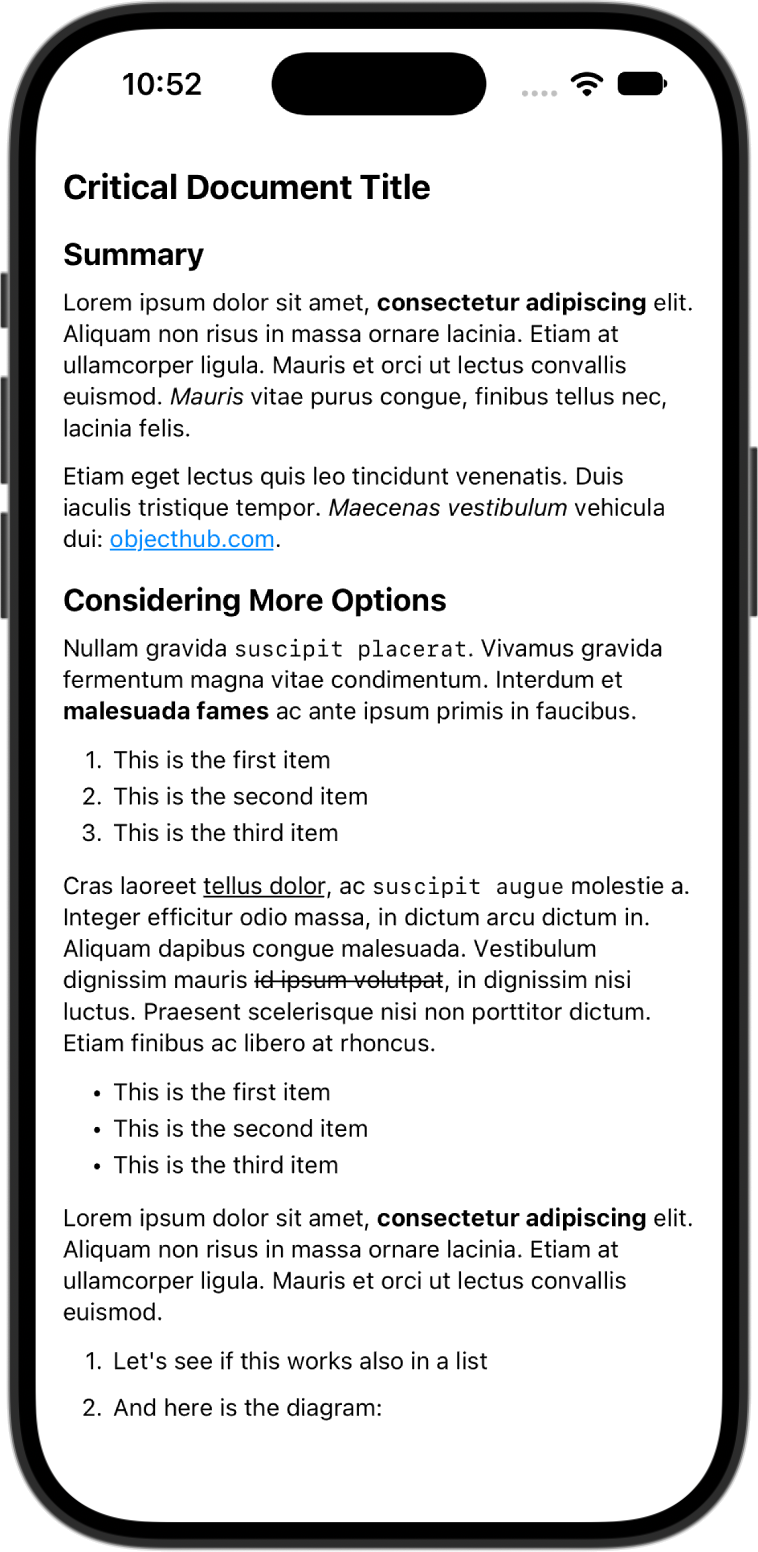
MarkdownText shows parsed Markdown content of type Block, or a string, which the standard parser of a MarkdownDialect parses (dialect:; the default is .extendedCommonMark, or .fullMath if math: is given). Either you pass a generator: that creates the attributed string (it is called again whenever the color scheme changes), or the view uses its default generators for light and dark mode, which renderingOptions: (the default is .trusted), mermaid:, math:, style: and darkStyle: configure. The view generates synchronously, so only some rendering options have an effect (remote images are never loaded); use .untrusted for Markdown that does not come from a trusted source. A view with a generator: that shows diagrams or formulas passes a prepare: function, which renders them in the background. See Displaying Markdown with SwiftUI for details.
struct MarkdownText: View {
  init(_ text: Block,
       waitingMessage: NSAttributedString = NSAttributedString(string: "⏳"),
       renderingOptions: AttributedStringGenerator.RenderingOptions = .trusted,
       mermaid: MermaidConfig? = nil,
       math: MathConfig? = nil,
       style: AttributedStringGenerator.Style? = nil,
       darkStyle: AttributedStringGenerator.Style? = nil) { ... }
  init(_ text: Block,
       waitingMessage: NSAttributedString = NSAttributedString(string: "⏳"),
       generator: ((Block, ColorScheme) -> NSAttributedString?)?,
       prepare: (@Sendable (Block, ColorScheme) async -> Bool)? = nil) { ... }
  // Two more initializers take `string: String, dialect: MarkdownDialect? = nil` instead of `_ text: Block`
}
A style changes the fonts, colors or spacing of the default generators for each mode:
var style = AttributedStringGenerator.Style.default
style.fontFamily = "Georgia, serif"
var darkStyle = AttributedStringGenerator.Style.dark
darkStyle.fontFamily = "Georgia, serif"
MarkdownText(string: text, style: style, darkStyle: darkStyle)
With a generator:, you have full control, e.g. over a subclass of the generator. This simple viewer uses two generators for light and dark mode:
struct ContentView: View {
  private static let lightGenerator = AttributedStringGenerator()
  private static let darkGenerator = AttributedStringGenerator(style: .dark)

  let content = ExtendedMarkdownParser.standard.parse("""
    Lorem ipsum dolor sit amet, **consectetur adipiscing** elit.

    1. This is the first item
    2. This is the second item
    """)

  var body: some View {
    MarkdownText(self.content) { doc, colorScheme in
      switch colorScheme {
        case .dark:
          return Self.darkGenerator.generate(doc: doc)
        default:
          return Self.lightGenerator.generate(doc: doc)
      }
    }
    .padding()
  }
}
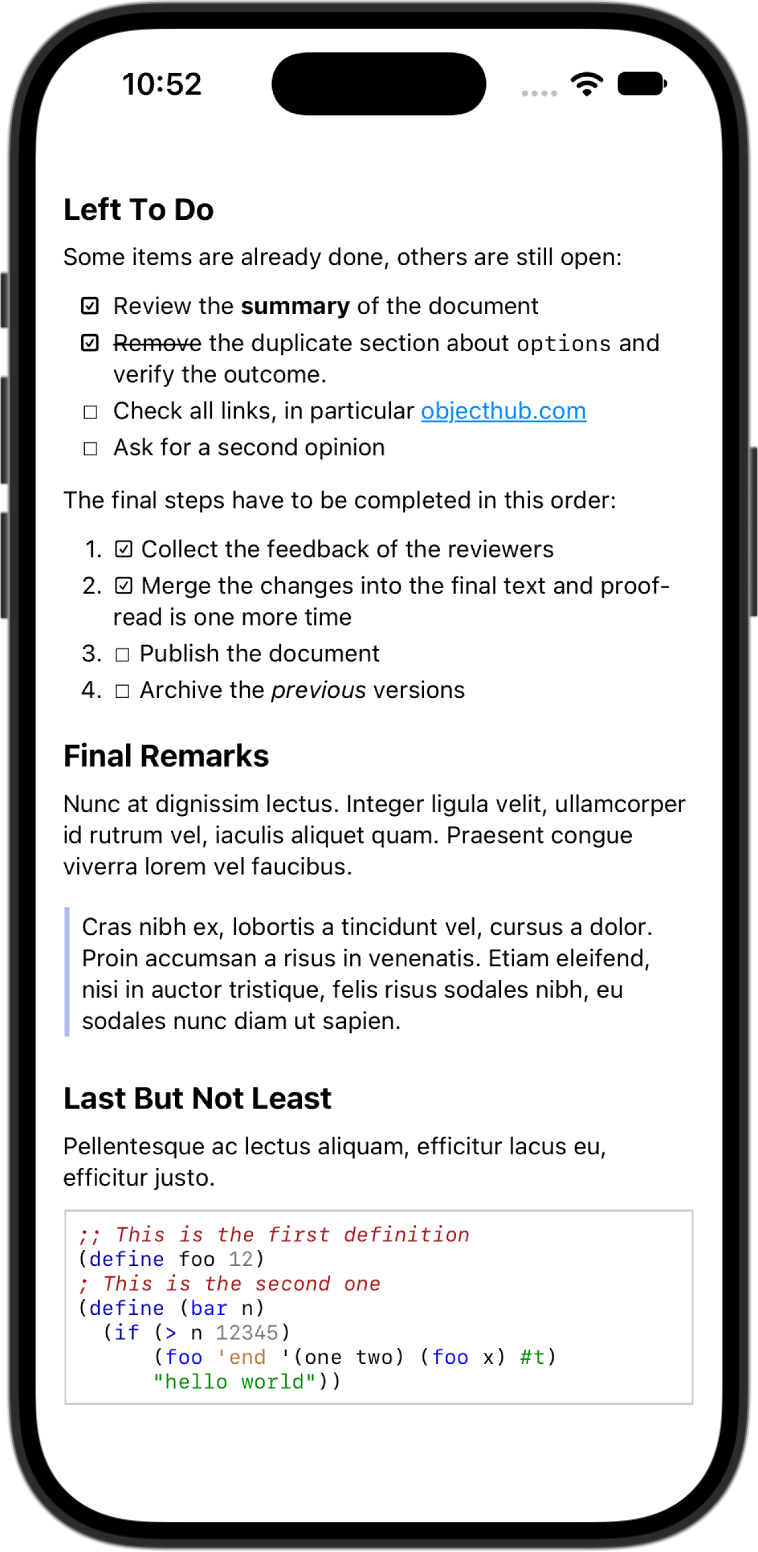
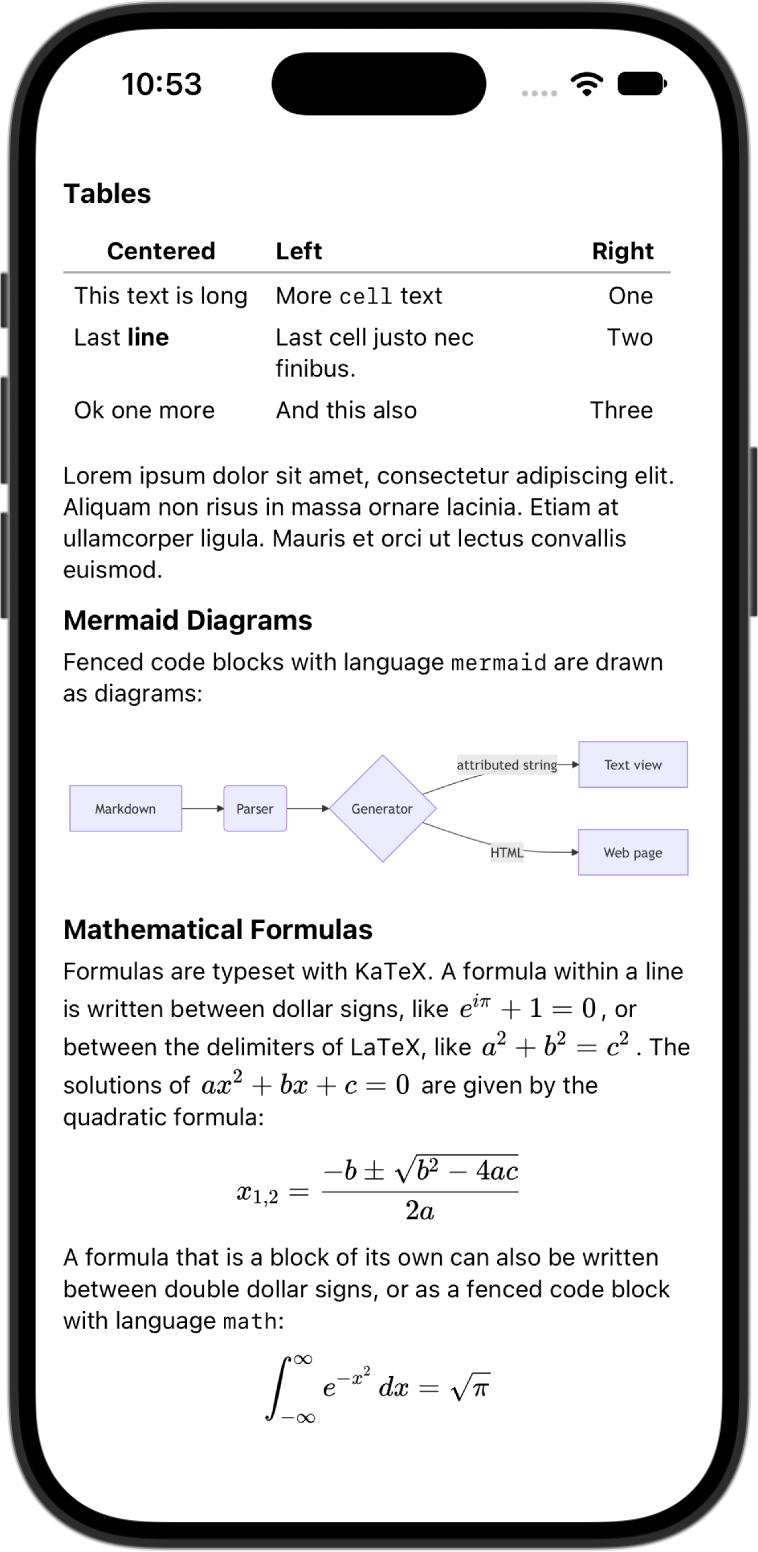
The Xcode project also contains a sample app, MarkdownViewer, which uses MarkdownText to display a demo document: formatted text, lists, task lists, syntax-highlighted code, tables, Mermaid diagrams and mathematical formulas. Here are three screenshots of the app running on iOS:
The parser passes all 652 examples of the CommonMark 0.31.2 specification. The test suite compares the generated HTML with the reference HTML of the specification, ignoring differences that do not change how browsers render the output: whitespace outside of code, " vs. ", <ol start="1"> vs. <ol>, and percent-encoding of URLs (MarkdownKit does not encode URLs).
There are a number of limitations:
- Extensions of GitHub Flavored Markdown other than tables, strikethrough and task lists (supported by
FullMarkdownParser) are not supported: extended autolinks and footnotes. - The block parser keeps trailing spaces and backslashes at the end of the lines of a paragraph; whether a line ending is a hard line break is only decided by the inline parser (
EscapeTransformer), because it depends on the inline markup (e.g. code spans). If you only parse the block structure (blockOnly: true), hard line breaks are not recognized.
The following technologies are needed to build the components of the Swift MarkdownKit framework. The command-line tools can be compiled with the Swift Package Manager, so Xcode is not strictly needed for that. Similarly, just for compiling the framework and trying the command-line tools in Xcode, the Swift Package Manager is not needed.
- Xcode 16 or later (the framework is developed with Xcode 26)
- Swift 6 toolchain (the package is compiled in Swift 6 language mode; clients can use any language mode)
- Swift Package Manager
Swift MarkdownKit supports Apple platforms only: macOS 11, iOS 15, tvOS 15 and watchOS 8 or later. Linux and other non-Apple platforms are not supported. Syntax highlighting and typesetting formulas with KaTeX rely on JavaScriptCore and are not available on watchOS. Mermaid diagrams and images of formulas (MathAttributedStringGenerator) rely on WebKit and are only available on macOS and iOS. The SwiftUI view MarkdownText is available on macOS 14 and iOS 17 or later. The command-line tools are only functional on macOS.
MarkdownKit is released under an Apache License 2.0.
MarkdownKit contains some code snippets from HighlighterSwift which is licensed under an MIT license. HighlighterSwift is © 2026, Tony Smith. Portions are © 2016, Juan Pablo Illanes.
The MarkdownKit framework comes with a copy of Highlight.js. Highlight.js is released under a BSD License.
The MarkdownKit framework also comes with a copy of Mermaid. Mermaid is released under an MIT License.
The MarkdownKit framework also comes with a copy of KaTeX (version 0.19.0: the script, the style sheet and the fonts). KaTeX is released under an MIT License. Its fonts are derived from the Computer Modern and AMS fonts, which are available under the SIL Open Font License 1.1.
Author: Matthias Zenger (matthias@objecthub.net)
Copyright © 2019-2025 Google LLC.
Copyright © 2026 Matthias Zenger.
Please note: This is not an official Google product.