
Live Site: https://pazvanti.github.io/DrakoFlow/


DrakoFlow is a lightweight, offline-first, client-side text-to-diagram engine written in TypeScript. It converts a clean, human-readable declarative DSL into interactive, themeable architecture diagrams, sequence flows, Git branching workflows, and 3D charts that run entirely in the browser, VS Code, IntelliJ, or silently across the web via the Chrome extension with no server-side dependencies.
Important
Privacy-First & Secure: Everything is processed locally. No diagram data is sent to a back-end server.
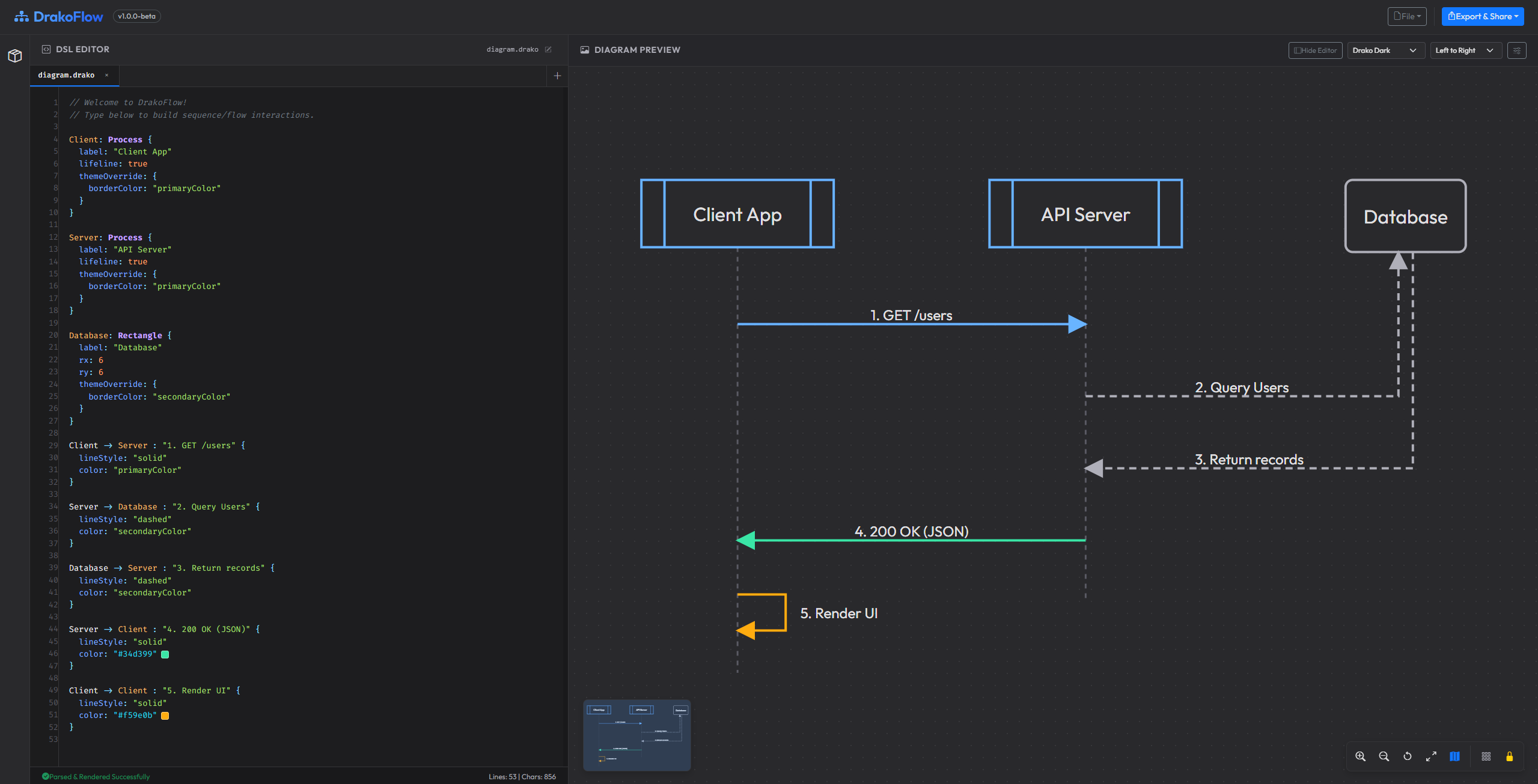
- Declarative DSL parser. Turn structured text blocks into diagrams instantly.
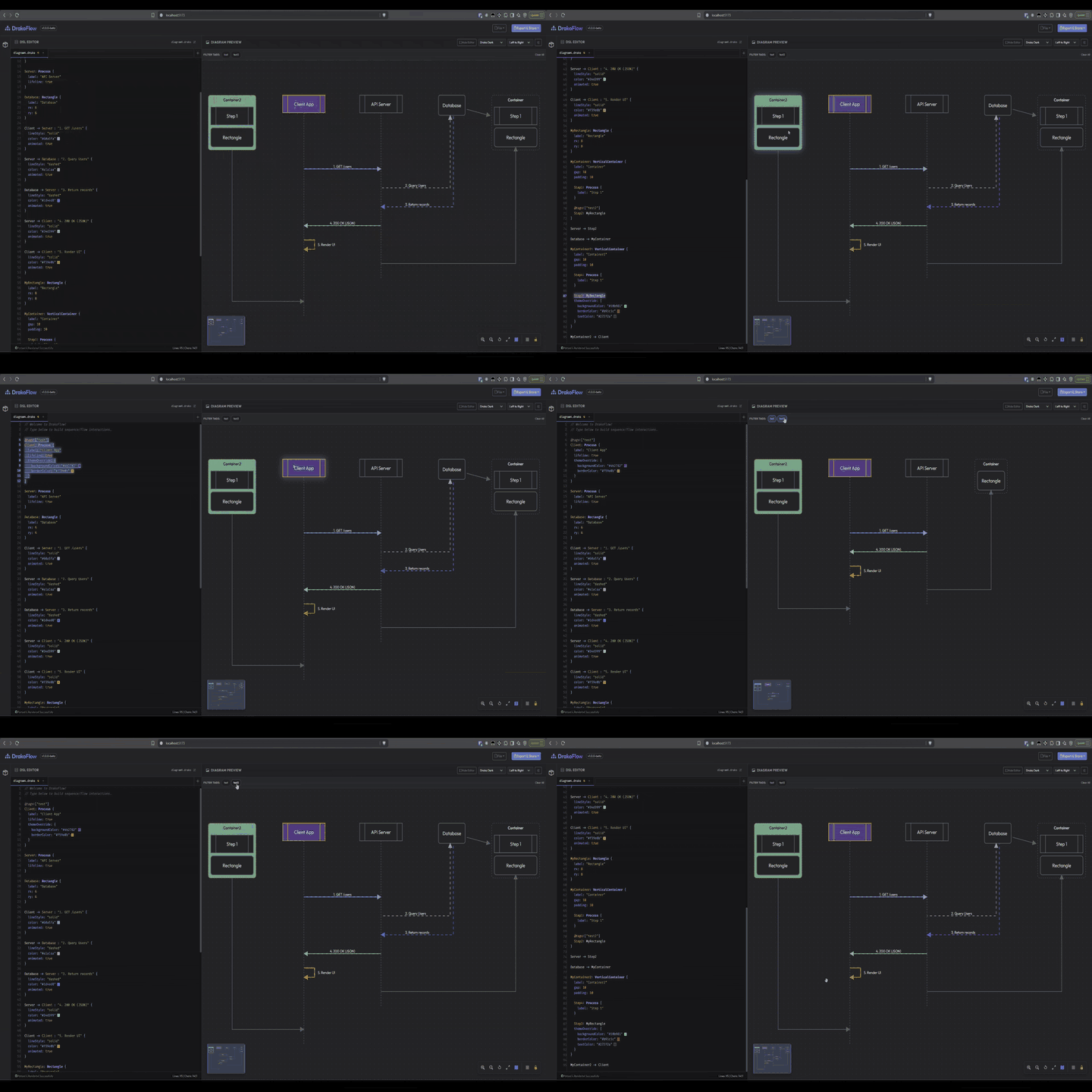
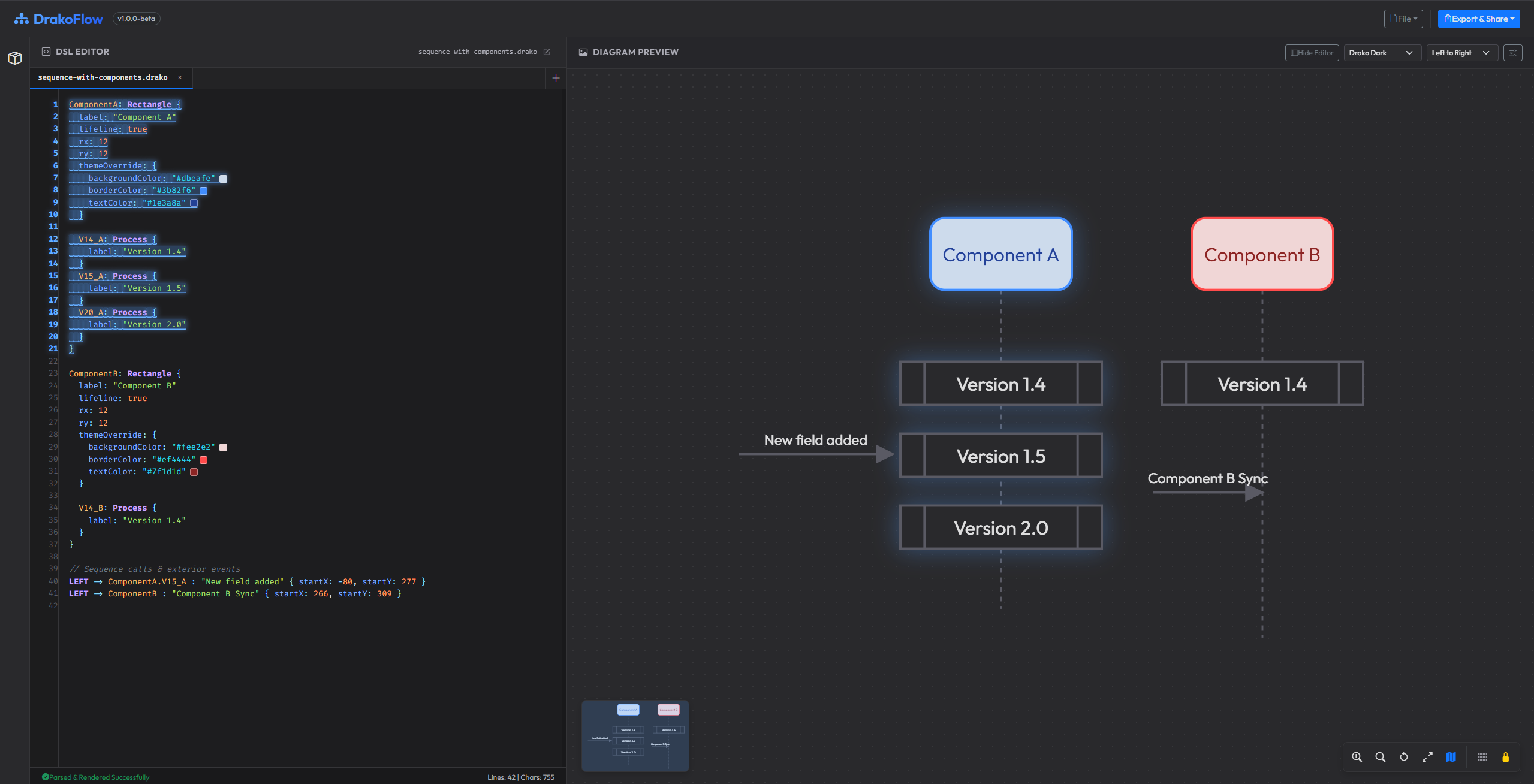
- Bi-directional editor ↔ canvas highlighting. Hover in the diagram to highlight the corresponding DSL lines, and vice versa.
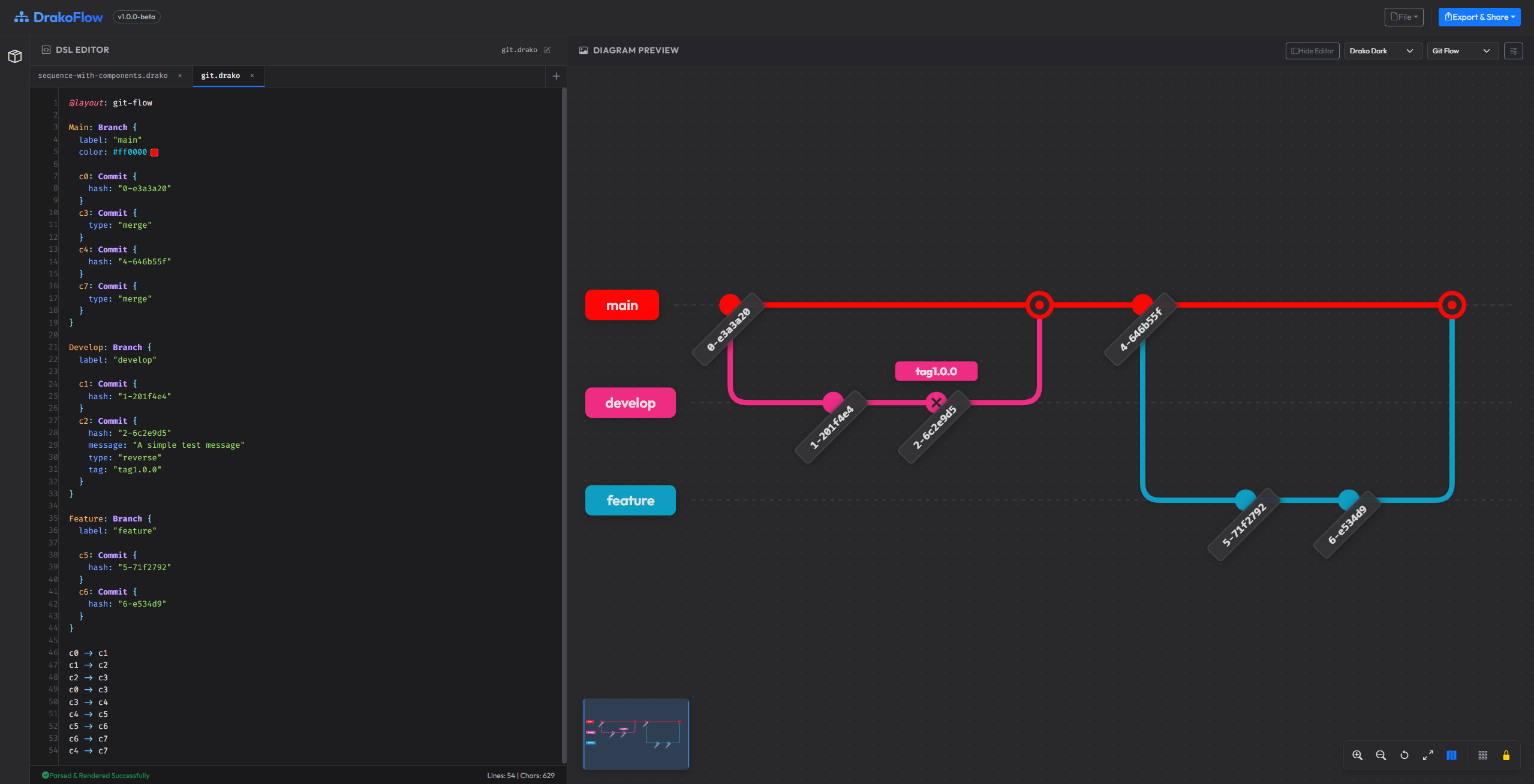
- Git Flow engine. Specialized
@layout: git-flowengine visualizing branch lanes, commit hash badges, and merge curves. - Sequence & flowchart engines. Left-to-right and top-to-bottom flows with lifelines, animated arrows, and routing.
- PlantUML translator (Beta). Import PlantUML and auto-translate it to DrakoFlow's DSL.
- Drag-and-drop overrides. Move elements on the canvas; coordinate overrides (
xandy) are rounded and serialized back into the DSL editor. - Canvas lock. Prevent accidental edits by locking the canvas.
- Nested scopes & packages. Group related components using
Packageblocks orVerticalContainerlayouts. - Themes & style overrides. Switch themes or customize shape colors via a
themeOverrideblock. - Offline export options. Export high-resolution PNG, copy SVG to clipboard, or export a self-contained interactive HTML player.
- Snap-to-grid & minimap. Toggle grid snapping and use the minimap for quick navigation.
- Serverless sharing. Share diagrams via compressed URL data.
| Sequence Flows & Architecture | Git Flow Branching |
|---|---|
 |
 |
| Bi-Directional Code Highlighting |
|---|
 |
Open the editor in your browser and try the engine immediately:
👉 Launch Interactive Editor (Live Site) or open the local file docs/drako/index.html.
Below is an example showing tags, nested packages, styling overrides, and connections:
// 1. Declare metadata tags to filter your views
@tags: ["gateway", "proxy"]
Gateway: Rectangle {
  label: "API Gateway"
  rx: 8
  ry: 8
  x: 50
  y: 155
}
// 2. Nest objects inside UML Package boundaries
@tags: ["core", "services"]
CoreDomain: Package {
  label: "Core Services"
  gap: 16
  padding: 20

  AuthService: Cube {
    label: "Auth Service"
    icon: "docker"
    themeOverride: {
      backgroundColor: "#1e1e2e"
      borderColor: "#8b5cf6"
      textColor: "#cdd6f4"
    }
  }

  PaymentService: UMLComponent {
    label: "Payment API"
    icon: "aws"
  }
}
// 3. Define structured databases
@tags: ["storage"]
UserDB: Cylinder {
  label: "User Store"
  icon: "postgres"
  x: 340
  y: 220
}
// 4. Connect elements with labels and styled routes
Gateway -> AuthService: "Validate token"
Gateway o-> PaymentService: "Process transaction"
AuthService <-> UserDB: "Read/Write credentials"
Add vector icons alongside label text using the icon attribute:
AuthService: Cube {
  label: "Auth API"
  icon: "docker" // Automatically renders the Docker vector logo
}
Built-in icons include docker, aws, postgres, gear, database, web-service, redis, react, node, python, kubernetes, lock, user, api, queue, storage, and cpu. Icons automatically adapt to the component's label text color across all themes.
Control the layout engine and diagram flow using the @layout directive:
@layout: left-to-right(Default) : Standard horizontal sequence & architecture flowchart engine.@layout: top-to-bottom: Vertical flow engine.@layout: git-flow: Specialized Git Flow visualization engine rendering branch tracks, smooth Bézier merge/fork curves, and slanted commit hash badges.@layout: mindmapor@layout: mindmap(RootNode): Radial mindmap layout engine with auto root detection, branch theme colors, and organic curved connections.
@layout: mindmap

mindmap: Ellipse {
  label: "mindmap"
}

Research: Rectangle { label: "Research" }
Tools: Rectangle { label: "Tools" }
Origins: Rectangle { label: "Origins" }

mindmap -> Research
mindmap -> Tools
mindmap -> Origins
@layout: git-flow

Main: Branch {
  label: "main"

  c0: Commit { hash: "0-e3a3a20" }
  c3: Commit { type: "merge" }
  c4: Commit { hash: "4-646b55f" }
}

Develop: Branch {
  label: "develop"

  c1: Commit { hash: "1-201f4e4" }
  c2: Commit { hash: "2-6c2e9d5" }
}

c0 -> c1
c1 -> c2
c2 -> c3
c0 -> c3
c3 -> c4
Rectangle: standard box with corner rounding (rx,ry).Cube: isometric 3D block for services.Cylinder: barrel shape for databases or caches.Ellipse: circular or oval nodes.Package: folder-style UML boundary for grouping.Actor: UML actor (stick figure) for external roles.Diamond: decision gateway for flowcharts.Hexagon: domain boundary or special shape.Process: process step box with segmented bars.Branch: Git branch guide lane for Git Flow diagrams.Commit: Git commit node with hash badges, merge double-rings, and release tags.Table: grid container representing tabular data.Class/Interface/Enum/Abstract/Struct/Object: UML object-oriented modeling shapes.Cloud/Node/Artifact/Folder/Frame/Storage/Stack/File/Card: Infrastructure and deployment shapes.Boundary/Control/Entity/Queue/Collections/Agent: Robustness and interaction shapes.SVGImage: embed vector content viacontent, scalable withscale.RasterImage: embed base64 raster images (PNG,JPEG,GIF) viacontent.Chart/Bar/Line: Multi-series charts with custom axes, 3D columnar bars, gradient line fills, and hover tooltips.
- VS Code Extension: Live side-by-side
.drakopreview and editing. - IntelliJ IDEA Plugin: Native split-view preview for JetBrains IDEs.
- Chrome Extension: Available on the Chrome Web Store and as direct download. Silent renderer that automatically turns ```drako markdown code blocks into live interactive HTML diagram players across web pages (GitHub, ChatGPT, Notion, GitLab, Jira).
Node.js v16 or later.
npm installnpm run devnpm run build:pagesThis runs a production build into dist/ and executes scripts/build-gh-pages.js to populate docs/drako/.
npm run testDrakoFlow is released under the GNU General Public License v3 (GPL-3.0). See the LICENSE file for details.