Repository navigation
en plugin dev components command
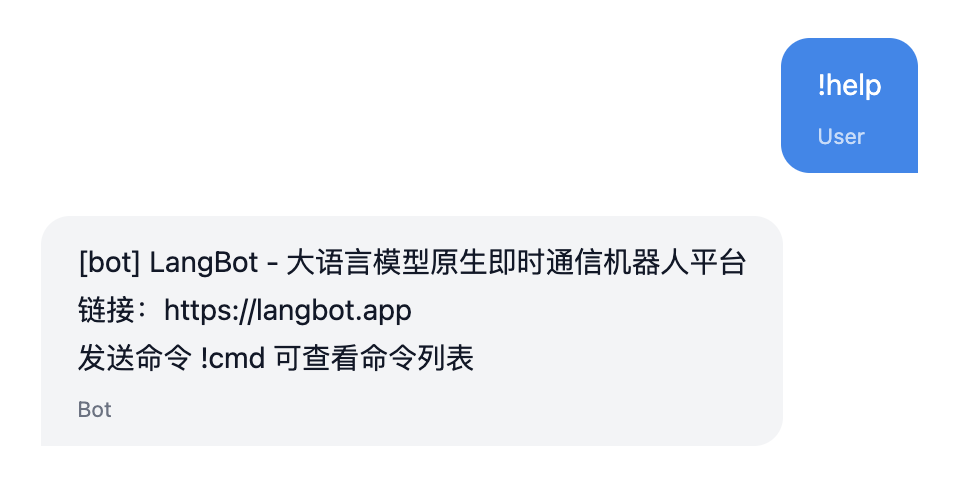
Command components are triggered by user command messages starting with ! (or other configured prefixes). Here's an example of triggering the !help command:
A single plugin can contain any number of commands. Execute the command lbp comp Command in the plugin directory and follow the prompts to enter the command configuration.
➜ HelloPlugin > lbp comp Command
Generating component Command...
Command name: info
Command description: Show information of the query
Component Command generated successfully.
组件 Command 生成成功。This will generate info.yaml and info.py files in the components/commands/ directory. The .yaml file defines the basic information for the !info command, and the .py file is the command handler:
➜ HelloPlugin > tree
...
├── components
│ ├── __init__.py
│ ├── commands
│ │ ├── __init__.py
│ │ ├── info.py
│ │ └── info.yaml
...apiVersion: v1 # Do not modify
kind: Command # Do not modify
metadata:
name: info # Command name, users will trigger this command with !info
label: # Command display name, shown in LangBot UI, supports multilingual
en_US: Info
zh_Hans: Info
description: # Command description, shown in LangBot UI, supports multilingual. Optional.
en_US: 'Show information of the query'
zh_Hans: '发送此次消息的详细信息'
spec:
execution:
python:
path: info.py # Command handler, do not modify
attr: Info # Command handler class name, matches the class name in info.pyThe following code is generated by default (components/command/<command_name>.py). You need to register and implement subcommand processing logic in the initialize method of the Info class.
# Auto generated by LangBot Plugin SDK.
# Please refer to https://langbot.app/docs/en/plugin/dev/tutor.html for more details.
from __future__ import annotations
from typing import Any, AsyncGenerator
from langbot_plugin.api.definition.components.command.command import Command, Subcommand
from langbot_plugin.api.entities.builtin.command.context import ExecuteContext, CommandReturn
class Info(Command):
async def initialize(self):
await super().initialize()
"Fill with your code here"Adding subcommands:
...
class Info(Command):
async def initialize(self):
await super().initialize()
@self.subcommand(
name="", # Empty string represents root command
help="Show information of the query", # Command help information
usage="info", # Command usage example, displayed in command help
aliases=["i"], # Command aliases
)
async def send(self, context: ExecuteContext) -> AsyncGenerator[CommandReturn, None]:
print(context)
reply_text = f"Query ID: {context.query_id}\n"
reply_text += f"command: {context.command}\n"
reply_text += f"command_text: {context.command_text}\n"
reply_text += f"params: {context.params}\n"
reply_text += f"crt_params: {context.crt_params}\n"
reply_text += f"privilege: {context.privilege}\n"
reply_text += f"session: {context.session.launcher_type.value}_{context.session.launcher_id}\n"
yield CommandReturn(
text=reply_text,
)
@self.subcommand(
name="field",
help="Show information of the field",
usage="info field",
aliases=["f"],
)
async def field(self, context: ExecuteContext) -> AsyncGenerator[CommandReturn, None]:
print(context)
field_name = context.crt_params[0]
field_value = getattr(context, field_name)
yield CommandReturn(
text=f"{field_name}: {field_value}",
)In this code, the send function is registered as a subcommand through the @self.subcommand decorator, prints the command context (ExecuteContext) information, and concatenates it into a reply message.
name is the subcommand name. Leaving it empty means handling the main command. If not empty, it matches the second parameter as the command. For example:
-
!infomatches the subcommand with name="" -
!info fieldmatches the subcommand with name="field" -
!info field valuematches the subcommand with name="field", withvalueas the subcommand parameter - Specialy,
name="*"matches all unmatched first-level subcommands, and passes each section afterinfoas parameters, for example!info 123,!info abc. You can get['123']or['abc']fromcontext.crt_params, depending on the user's input.
In subcommand functions, you can read command parameters through the context variable.
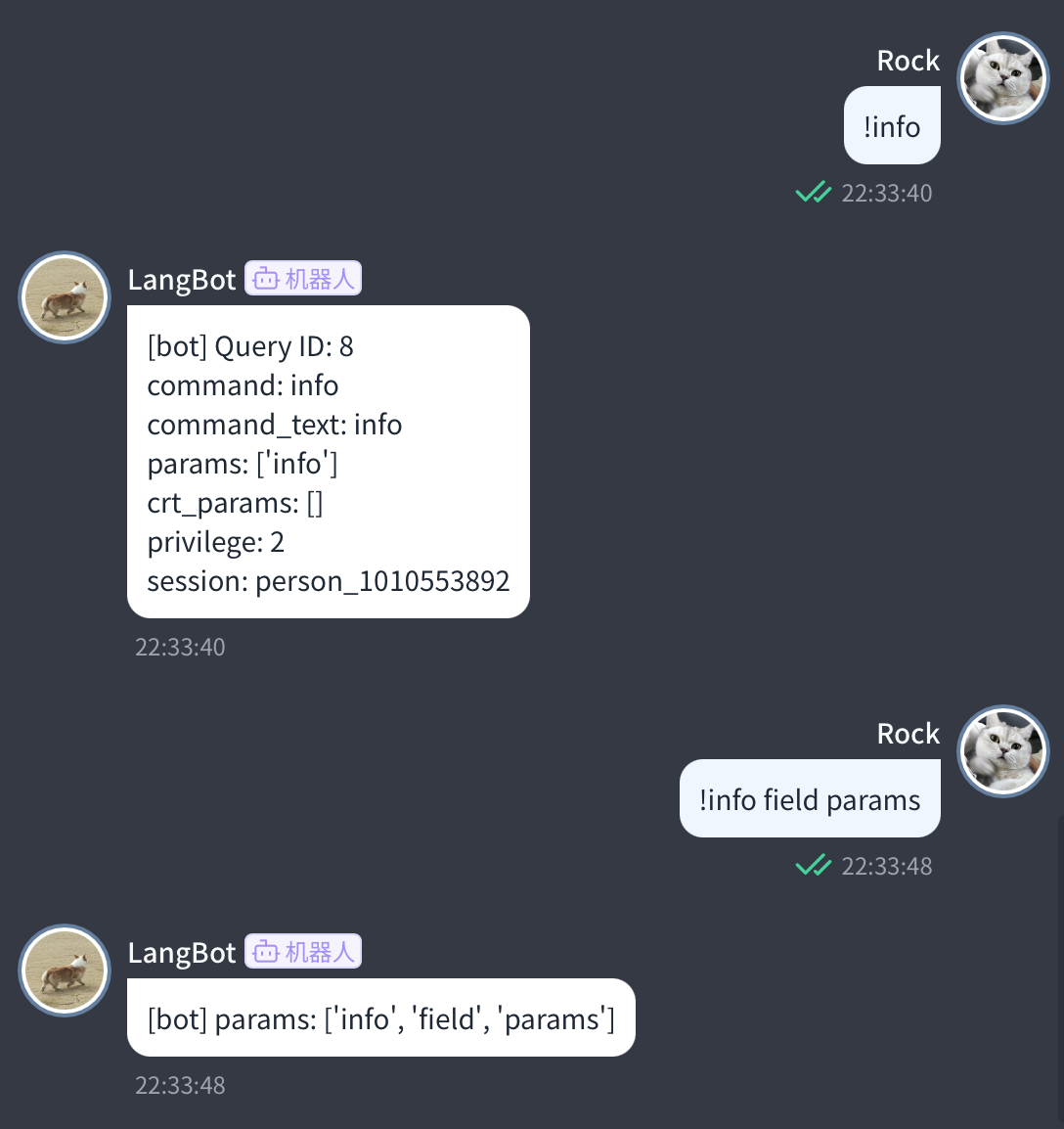
The effect of the above command is shown in the image:
class ExecuteContext(pydantic.BaseModel):
"""Single command execution context"""
query_id: int
"""Request ID"""
session: provider_session.Session
"""Session object for this message"""
command_text: str
"""Complete command text"""
command: str
"""Command name"""
crt_command: str
"""Current command
In multi-level commands, crt_command is the current command, command is the root command.
Example: !plugin on Webwlkr
When processing plugin, command is plugin, crt_command is plugin
When processing on, command is plugin, crt_command is on
"""
params: list[str]
"""Command parameters
Parameter list after splitting the entire command by spaces
"""
crt_params: list[str]
"""Current command parameters
In multi-level commands, crt_params are current command parameters, params are root command parameters.
Example: !plugin on Webwlkr
When processing plugin, params is ['on', 'Webwlkr'], crt_params is ['on', 'Webwlkr']
When processing on, params is ['on', 'Webwlkr'], crt_params is ['Webwlkr']
"""
privilege: int
"""Session privilege level"""
...Command return values (CommandReturn) currently support returning text, images (image_url, image links), and errors.
yield CommandReturn(
text=reply_text,
)
yield CommandReturn(
image_url=image_url,
)Command processing supports returning multiple messages, so please use yield statements to return messages.
For specific return values, please refer to the definition of CommandReturn: langbot_plugin.api.entities.builtin.command.context.CommandReturn
A single command is triggered concurrently by several conversations:
- Read config per call; never read it in
initialize()and cache it on the instance. - Never leave command arguments, return values or conversation data on instance fields or module-level variables;
ExecuteContextis valid only for the current execution. - Concurrent triggering means instance fields get interleaved writes — do not use them to hold "current conversation" style state. Data that must survive calls belongs in Host storage, keyed with the conversation identity.
- If you keep per-installation process-local caches, release them in
on_installation_revoked(binding).
See Certified plugins and shared runtime for the full specification.
You have learned the basic information about command registration and command execution. Next, you can:
- See the complete
ExecuteContextAPI reference. - Check out Plugin Common APIs.
Automatically synchronized from LangBot/docs.
简体中文
指南
- 快速开始
- 安装部署
- 配置机器人
- 配置 AI 能力
-
接入实例
- 接入实例
- Dify
- n8n
- Coze
- Langflow
-
DeepSeek
- 用 DeepSeek 搭建Telegram AI 机器人
- 用 DeepSeek 搭建Discord AI 机器人
- 用 DeepSeek 搭建Slack AI 机器人
- 用 DeepSeek 搭建飞书 AI 机器人
- 用 DeepSeek 搭建钉钉 AI 机器人
- 用 DeepSeek 搭建企业微信应用 AI 机器人
- 用 DeepSeek 搭建企业微信智能机器人 AI 机器人
- 用 DeepSeek 搭建微信客服 AI 机器人
- 用 DeepSeek 搭建微信公众号 AI 机器人
- 用 DeepSeek 搭建QQ 官方机器人 AI 机器人
- 用 DeepSeek 搭建LINE AI 机器人
- 用 DeepSeek 搭建KOOK AI 机器人
- 用 DeepSeek 搭建Mattermost AI 机器人
- 用 DeepSeek 搭建网页聊天挂件 AI 机器人
-
OpenAI (ChatGPT models)
- 用 OpenAI (ChatGPT models) 搭建Telegram AI 机器人
- 用 OpenAI (ChatGPT models) 搭建Discord AI 机器人
- 用 OpenAI (ChatGPT models) 搭建Slack AI 机器人
- 用 OpenAI (ChatGPT models) 搭建飞书 AI 机器人
- 用 OpenAI (ChatGPT models) 搭建钉钉 AI 机器人
- 用 OpenAI (ChatGPT models) 搭建企业微信应用 AI 机器人
- 用 OpenAI (ChatGPT models) 搭建企业微信智能机器人 AI 机器人
- 用 OpenAI (ChatGPT models) 搭建微信客服 AI 机器人
- 用 OpenAI (ChatGPT models) 搭建微信公众号 AI 机器人
- 用 OpenAI (ChatGPT models) 搭建QQ 官方机器人 AI 机器人
- 用 OpenAI (ChatGPT models) 搭建LINE AI 机器人
- 用 OpenAI (ChatGPT models) 搭建KOOK AI 机器人
- 用 OpenAI (ChatGPT models) 搭建Mattermost AI 机器人
- 用 OpenAI (ChatGPT models) 搭建网页聊天挂件 AI 机器人
-
Claude
- 用 Claude 搭建Telegram AI 机器人
- 用 Claude 搭建Discord AI 机器人
- 用 Claude 搭建Slack AI 机器人
- 用 Claude 搭建飞书 AI 机器人
- 用 Claude 搭建钉钉 AI 机器人
- 用 Claude 搭建企业微信应用 AI 机器人
- 用 Claude 搭建企业微信智能机器人 AI 机器人
- 用 Claude 搭建微信客服 AI 机器人
- 用 Claude 搭建微信公众号 AI 机器人
- 用 Claude 搭建QQ 官方机器人 AI 机器人
- 用 Claude 搭建LINE AI 机器人
- 用 Claude 搭建KOOK AI 机器人
- 用 Claude 搭建Mattermost AI 机器人
- 用 Claude 搭建网页聊天挂件 AI 机器人
-
Gemini
- 用 Gemini 搭建Telegram AI 机器人
- 用 Gemini 搭建Discord AI 机器人
- 用 Gemini 搭建Slack AI 机器人
- 用 Gemini 搭建飞书 AI 机器人
- 用 Gemini 搭建钉钉 AI 机器人
- 用 Gemini 搭建企业微信应用 AI 机器人
- 用 Gemini 搭建企业微信智能机器人 AI 机器人
- 用 Gemini 搭建微信客服 AI 机器人
- 用 Gemini 搭建微信公众号 AI 机器人
- 用 Gemini 搭建QQ 官方机器人 AI 机器人
- 用 Gemini 搭建LINE AI 机器人
- 用 Gemini 搭建KOOK AI 机器人
- 用 Gemini 搭建Mattermost AI 机器人
- 用 Gemini 搭建网页聊天挂件 AI 机器人
-
Qwen
- 用 Qwen 搭建Telegram AI 机器人
- 用 Qwen 搭建Discord AI 机器人
- 用 Qwen 搭建Slack AI 机器人
- 用 Qwen 搭建飞书 AI 机器人
- 用 Qwen 搭建钉钉 AI 机器人
- 用 Qwen 搭建企业微信应用 AI 机器人
- 用 Qwen 搭建企业微信智能机器人 AI 机器人
- 用 Qwen 搭建微信客服 AI 机器人
- 用 Qwen 搭建微信公众号 AI 机器人
- 用 Qwen 搭建QQ 官方机器人 AI 机器人
- 用 Qwen 搭建LINE AI 机器人
- 用 Qwen 搭建KOOK AI 机器人
- 用 Qwen 搭建Mattermost AI 机器人
- 用 Qwen 搭建网页聊天挂件 AI 机器人
-
Ollama
- 用 Ollama 搭建Telegram AI 机器人
- 用 Ollama 搭建Discord AI 机器人
- 用 Ollama 搭建Slack AI 机器人
- 用 Ollama 搭建飞书 AI 机器人
- 用 Ollama 搭建钉钉 AI 机器人
- 用 Ollama 搭建企业微信应用 AI 机器人
- 用 Ollama 搭建企业微信智能机器人 AI 机器人
- 用 Ollama 搭建微信客服 AI 机器人
- 用 Ollama 搭建微信公众号 AI 机器人
- 用 Ollama 搭建QQ 官方机器人 AI 机器人
- 用 Ollama 搭建LINE AI 机器人
- 用 Ollama 搭建KOOK AI 机器人
- 用 Ollama 搭建Mattermost AI 机器人
- 用 Ollama 搭建网页聊天挂件 AI 机器人
- 进阶运维
- 插件使用
- 企业支持
开发者
- 插件开发
- 插件 SDK API
- 核心开发
文章
- 浏览
- 产品动态
- 技术解析
-
教程与集成
- 在飞书里查询 GitHub 更新:Dify Workflow + GPT-6 Astra + LangBot 实战
- 让客服问题走对分支:Dify + LangBot 钉钉、企业微信机器人实战
- 把群公告交给 Dify:用 GPT-6 Astra 和 LangBot 搭建 QQ、飞书写作助手
- LangTARS:开源 AI Agent 远程控制电脑 — 支持接入 Dify 和 n8n 工作流
- 5分钟将 DeepSeek R1 接入微信、企业微信与 Discord (免费教程)
- 5 分钟部署你的 AI 机器人到 Discord、Telegram 和微信
- 终于让 Dify Agent 在 Discord、Telegram 和 Slack 上跑起来了
- 用 Langflow 拖拽式工作流构建多平台 AI 机器人
- 用 n8n 和 LangBot 构建多平台 AI 聊天机器人
- LangBot 4.6.0 外部知识库教程:集成 Dify 实现 RAG 对话
- Telegram:体验 LangBot 沙箱 Agent
- LangBot 公众号:体验基础 AI 问答
- 企业微信客服:体验 LangBot 知识库
- 公告
API 参考
- Service API
English
Guides
- Quick Start
- Installation
-
Configure Bots
- Bots
- Discord
- Telegram
- Slack
- Mattermost
- LINE
- Web Page Bot
- HTTP Bot
- KOOK
- Feishu
- DingTalk
- WeChat Official Account
- QQ (OneBot v11)
- Satori (QQ & Multi-Platform)
- QQ Official Bot
- WeCom (Enterprise WeChat)
- AI Configuration
-
Integration Recipes
- Integration Recipes
-
Dify
- Connect Dify to Telegram
- Connect Dify to Discord
- Connect Dify to Slack
- Connect Dify to Lark (Feishu)
- Connect Dify to DingTalk
- Connect Dify to WeCom (internal app)
- Connect Dify to WeCom Intelligent Bot
- Connect Dify to WeCom Customer Service
- Connect Dify to WeChat Official Account
- Connect Dify to QQ Official Bot
- Connect Dify to LINE
- Connect Dify to KOOK
- Connect Dify to Mattermost
- Connect Dify to a website chat widget
-
n8n
- Connect n8n to Telegram
- Connect n8n to Discord
- Connect n8n to Slack
- Connect n8n to Lark (Feishu)
- Connect n8n to DingTalk
- Connect n8n to WeCom (internal app)
- Connect n8n to WeCom Intelligent Bot
- Connect n8n to WeCom Customer Service
- Connect n8n to WeChat Official Account
- Connect n8n to QQ Official Bot
- Connect n8n to LINE
- Connect n8n to KOOK
- Connect n8n to Mattermost
- Connect n8n to a website chat widget
-
Coze
- Connect Coze to Telegram
- Connect Coze to Discord
- Connect Coze to Slack
- Connect Coze to Lark (Feishu)
- Connect Coze to DingTalk
- Connect Coze to WeCom (internal app)
- Connect Coze to WeCom Intelligent Bot
- Connect Coze to WeCom Customer Service
- Connect Coze to WeChat Official Account
- Connect Coze to QQ Official Bot
- Connect Coze to LINE
- Connect Coze to KOOK
- Connect Coze to Mattermost
- Connect Coze to a website chat widget
-
Langflow
- Connect Langflow to Telegram
- Connect Langflow to Discord
- Connect Langflow to Slack
- Connect Langflow to Lark (Feishu)
- Connect Langflow to DingTalk
- Connect Langflow to WeCom (internal app)
- Connect Langflow to WeCom Intelligent Bot
- Connect Langflow to WeCom Customer Service
- Connect Langflow to WeChat Official Account
- Connect Langflow to QQ Official Bot
- Connect Langflow to LINE
- Connect Langflow to KOOK
- Connect Langflow to Mattermost
- Connect Langflow to a website chat widget
-
DeepSeek
- Build a Telegram AI Bot with DeepSeek
- Build a Discord AI Bot with DeepSeek
- Build a Slack AI Bot with DeepSeek
- Build a Lark (Feishu) AI Bot with DeepSeek
- Build a DingTalk AI Bot with DeepSeek
- Build a WeCom (internal app) AI Bot with DeepSeek
- Build a WeCom Intelligent Bot AI Bot with DeepSeek
- Build a WeCom Customer Service AI Bot with DeepSeek
- Build a WeChat Official Account AI Bot with DeepSeek
- Build a QQ Official Bot AI Bot with DeepSeek
- Build a LINE AI Bot with DeepSeek
- Build a KOOK AI Bot with DeepSeek
- Build a Mattermost AI Bot with DeepSeek
- Build a a website chat widget AI Bot with DeepSeek
-
OpenAI (ChatGPT models)
- Build a Telegram AI Bot with OpenAI (ChatGPT models)
- Build a Discord AI Bot with OpenAI (ChatGPT models)
- Build a Slack AI Bot with OpenAI (ChatGPT models)
- Build a Lark (Feishu) AI Bot with OpenAI (ChatGPT models)
- Build a DingTalk AI Bot with OpenAI (ChatGPT models)
- Build a WeCom (internal app) AI Bot with OpenAI (ChatGPT models)
- Build a WeCom Intelligent Bot AI Bot with OpenAI (ChatGPT models)
- Build a WeCom Customer Service AI Bot with OpenAI (ChatGPT models)
- Build a WeChat Official Account AI Bot with OpenAI (ChatGPT models)
- Build a QQ Official Bot AI Bot with OpenAI (ChatGPT models)
- Build a LINE AI Bot with OpenAI (ChatGPT models)
- Build a KOOK AI Bot with OpenAI (ChatGPT models)
- Build a Mattermost AI Bot with OpenAI (ChatGPT models)
- Build a a website chat widget AI Bot with OpenAI (ChatGPT models)
-
Claude
- Build a Telegram AI Bot with Claude
- Build a Discord AI Bot with Claude
- Build a Slack AI Bot with Claude
- Build a Lark (Feishu) AI Bot with Claude
- Build a DingTalk AI Bot with Claude
- Build a WeCom (internal app) AI Bot with Claude
- Build a WeCom Intelligent Bot AI Bot with Claude
- Build a WeCom Customer Service AI Bot with Claude
- Build a WeChat Official Account AI Bot with Claude
- Build a QQ Official Bot AI Bot with Claude
- Build a LINE AI Bot with Claude
- Build a KOOK AI Bot with Claude
- Build a Mattermost AI Bot with Claude
- Build a a website chat widget AI Bot with Claude
-
Gemini
- Build a Telegram AI Bot with Gemini
- Build a Discord AI Bot with Gemini
- Build a Slack AI Bot with Gemini
- Build a Lark (Feishu) AI Bot with Gemini
- Build a DingTalk AI Bot with Gemini
- Build a WeCom (internal app) AI Bot with Gemini
- Build a WeCom Intelligent Bot AI Bot with Gemini
- Build a WeCom Customer Service AI Bot with Gemini
- Build a WeChat Official Account AI Bot with Gemini
- Build a QQ Official Bot AI Bot with Gemini
- Build a LINE AI Bot with Gemini
- Build a KOOK AI Bot with Gemini
- Build a Mattermost AI Bot with Gemini
- Build a a website chat widget AI Bot with Gemini
-
Qwen
- Build a Telegram AI Bot with Qwen
- Build a Discord AI Bot with Qwen
- Build a Slack AI Bot with Qwen
- Build a Lark (Feishu) AI Bot with Qwen
- Build a DingTalk AI Bot with Qwen
- Build a WeCom (internal app) AI Bot with Qwen
- Build a WeCom Intelligent Bot AI Bot with Qwen
- Build a WeCom Customer Service AI Bot with Qwen
- Build a WeChat Official Account AI Bot with Qwen
- Build a QQ Official Bot AI Bot with Qwen
- Build a LINE AI Bot with Qwen
- Build a KOOK AI Bot with Qwen
- Build a Mattermost AI Bot with Qwen
- Build a a website chat widget AI Bot with Qwen
-
Ollama
- Build a Telegram AI Bot with Ollama
- Build a Discord AI Bot with Ollama
- Build a Slack AI Bot with Ollama
- Build a Lark (Feishu) AI Bot with Ollama
- Build a DingTalk AI Bot with Ollama
- Build a WeCom (internal app) AI Bot with Ollama
- Build a WeCom Intelligent Bot AI Bot with Ollama
- Build a WeCom Customer Service AI Bot with Ollama
- Build a WeChat Official Account AI Bot with Ollama
- Build a QQ Official Bot AI Bot with Ollama
- Build a LINE AI Bot with Ollama
- Build a KOOK AI Bot with Ollama
- Build a Mattermost AI Bot with Ollama
- Build a a website chat widget AI Bot with Ollama
- Advanced Operations
- Using Plugins
- Enterprise support
Developers
- Plugin Development
- Plugin SDK API
- Core Development
Articles
- Browse
- Product Updates
- Engineering
-
Tutorials & Integrations
- Turn GitHub Releases into Telegram Briefings with Dify and LangBot
- Route Support Questions in Discord and LINE with Dify and LangBot
- A Dify Writing Assistant for Discord and Telegram with GPT-6 Astra and LangBot
- LangTARS: Open-Source AI Agent for Remote PC Control — Works with Dify, n8n & 10+ Messaging Platforms
- How to Connect DeepSeek R1 to WeChat, Discord & Telegram in 5 Minutes (FREE)
- Deploy Your Own AI Bot to Discord, Telegram & WeChat in 5 Minutes
- Finally Got My Dify Agent Working in Discord, Telegram and Slack
- How I Built a Multi-Platform AI Bot with Langflow's Drag-and-Drop Workflows
- How I Built a Multi-Platform AI Chatbot with n8n and LangBot
- LangBot 4.6.0 External Knowledge Base Tutorial: Integrating Dify with LangBot for RAG-powered Conversations
- Announcements
API Reference
- Service API
Other pages
日本語
ガイド
- クイックスタート
- インストール
- ボットを設定
- AI 設定
-
連携レシピ
- 連携レシピ
-
Dify
- Dify を Telegram に接続する
- Dify を Discord に接続する
- Dify を Slack に接続する
- Dify を Lark(Feishu) に接続する
- Dify を DingTalk に接続する
- Dify を WeCom(社内アプリ) に接続する
- Dify を WeCom インテリジェントボット に接続する
- Dify を WeCom カスタマーサービス に接続する
- Dify を WeChat 公式アカウント に接続する
- Dify を QQ 公式ボット に接続する
- Dify を LINE に接続する
- Dify を KOOK に接続する
- Dify を Mattermost に接続する
- Dify を Web サイトのチャットウィジェット に接続する
-
n8n
- n8n を Telegram に接続する
- n8n を Discord に接続する
- n8n を Slack に接続する
- n8n を Lark(Feishu) に接続する
- n8n を DingTalk に接続する
- n8n を WeCom(社内アプリ) に接続する
- n8n を WeCom インテリジェントボット に接続する
- n8n を WeCom カスタマーサービス に接続する
- n8n を WeChat 公式アカウント に接続する
- n8n を QQ 公式ボット に接続する
- n8n を LINE に接続する
- n8n を KOOK に接続する
- n8n を Mattermost に接続する
- n8n を Web サイトのチャットウィジェット に接続する
-
Coze
- Coze を Telegram に接続する
- Coze を Discord に接続する
- Coze を Slack に接続する
- Coze を Lark(Feishu) に接続する
- Coze を DingTalk に接続する
- Coze を WeCom(社内アプリ) に接続する
- Coze を WeCom インテリジェントボット に接続する
- Coze を WeCom カスタマーサービス に接続する
- Coze を WeChat 公式アカウント に接続する
- Coze を QQ 公式ボット に接続する
- Coze を LINE に接続する
- Coze を KOOK に接続する
- Coze を Mattermost に接続する
- Coze を Web サイトのチャットウィジェット に接続する
-
Langflow
- Langflow を Telegram に接続する
- Langflow を Discord に接続する
- Langflow を Slack に接続する
- Langflow を Lark(Feishu) に接続する
- Langflow を DingTalk に接続する
- Langflow を WeCom(社内アプリ) に接続する
- Langflow を WeCom インテリジェントボット に接続する
- Langflow を WeCom カスタマーサービス に接続する
- Langflow を WeChat 公式アカウント に接続する
- Langflow を QQ 公式ボット に接続する
- Langflow を LINE に接続する
- Langflow を KOOK に接続する
- Langflow を Mattermost に接続する
- Langflow を Web サイトのチャットウィジェット に接続する
-
DeepSeek
- DeepSeek で Telegram の AI ボットを作る
- DeepSeek で Discord の AI ボットを作る
- DeepSeek で Slack の AI ボットを作る
- DeepSeek で Lark(Feishu) の AI ボットを作る
- DeepSeek で DingTalk の AI ボットを作る
- DeepSeek で WeCom(社内アプリ) の AI ボットを作る
- DeepSeek で WeCom インテリジェントボット の AI ボットを作る
- DeepSeek で WeCom カスタマーサービス の AI ボットを作る
- DeepSeek で WeChat 公式アカウント の AI ボットを作る
- DeepSeek で QQ 公式ボット の AI ボットを作る
- DeepSeek で LINE の AI ボットを作る
- DeepSeek で KOOK の AI ボットを作る
- DeepSeek で Mattermost の AI ボットを作る
- DeepSeek で Web サイトのチャットウィジェット の AI ボットを作る
-
OpenAI (ChatGPT models)
- OpenAI (ChatGPT models) で Telegram の AI ボットを作る
- OpenAI (ChatGPT models) で Discord の AI ボットを作る
- OpenAI (ChatGPT models) で Slack の AI ボットを作る
- OpenAI (ChatGPT models) で Lark(Feishu) の AI ボットを作る
- OpenAI (ChatGPT models) で DingTalk の AI ボットを作る
- OpenAI (ChatGPT models) で WeCom(社内アプリ) の AI ボットを作る
- OpenAI (ChatGPT models) で WeCom インテリジェントボット の AI ボットを作る
- OpenAI (ChatGPT models) で WeCom カスタマーサービス の AI ボットを作る
- OpenAI (ChatGPT models) で WeChat 公式アカウント の AI ボットを作る
- OpenAI (ChatGPT models) で QQ 公式ボット の AI ボットを作る
- OpenAI (ChatGPT models) で LINE の AI ボットを作る
- OpenAI (ChatGPT models) で KOOK の AI ボットを作る
- OpenAI (ChatGPT models) で Mattermost の AI ボットを作る
- OpenAI (ChatGPT models) で Web サイトのチャットウィジェット の AI ボットを作る
-
Claude
- Claude で Telegram の AI ボットを作る
- Claude で Discord の AI ボットを作る
- Claude で Slack の AI ボットを作る
- Claude で Lark(Feishu) の AI ボットを作る
- Claude で DingTalk の AI ボットを作る
- Claude で WeCom(社内アプリ) の AI ボットを作る
- Claude で WeCom インテリジェントボット の AI ボットを作る
- Claude で WeCom カスタマーサービス の AI ボットを作る
- Claude で WeChat 公式アカウント の AI ボットを作る
- Claude で QQ 公式ボット の AI ボットを作る
- Claude で LINE の AI ボットを作る
- Claude で KOOK の AI ボットを作る
- Claude で Mattermost の AI ボットを作る
- Claude で Web サイトのチャットウィジェット の AI ボットを作る
-
Gemini
- Gemini で Telegram の AI ボットを作る
- Gemini で Discord の AI ボットを作る
- Gemini で Slack の AI ボットを作る
- Gemini で Lark(Feishu) の AI ボットを作る
- Gemini で DingTalk の AI ボットを作る
- Gemini で WeCom(社内アプリ) の AI ボットを作る
- Gemini で WeCom インテリジェントボット の AI ボットを作る
- Gemini で WeCom カスタマーサービス の AI ボットを作る
- Gemini で WeChat 公式アカウント の AI ボットを作る
- Gemini で QQ 公式ボット の AI ボットを作る
- Gemini で LINE の AI ボットを作る
- Gemini で KOOK の AI ボットを作る
- Gemini で Mattermost の AI ボットを作る
- Gemini で Web サイトのチャットウィジェット の AI ボットを作る
-
Qwen
- Qwen で Telegram の AI ボットを作る
- Qwen で Discord の AI ボットを作る
- Qwen で Slack の AI ボットを作る
- Qwen で Lark(Feishu) の AI ボットを作る
- Qwen で DingTalk の AI ボットを作る
- Qwen で WeCom(社内アプリ) の AI ボットを作る
- Qwen で WeCom インテリジェントボット の AI ボットを作る
- Qwen で WeCom カスタマーサービス の AI ボットを作る
- Qwen で WeChat 公式アカウント の AI ボットを作る
- Qwen で QQ 公式ボット の AI ボットを作る
- Qwen で LINE の AI ボットを作る
- Qwen で KOOK の AI ボットを作る
- Qwen で Mattermost の AI ボットを作る
- Qwen で Web サイトのチャットウィジェット の AI ボットを作る
-
Ollama
- Ollama で Telegram の AI ボットを作る
- Ollama で Discord の AI ボットを作る
- Ollama で Slack の AI ボットを作る
- Ollama で Lark(Feishu) の AI ボットを作る
- Ollama で DingTalk の AI ボットを作る
- Ollama で WeCom(社内アプリ) の AI ボットを作る
- Ollama で WeCom インテリジェントボット の AI ボットを作る
- Ollama で WeCom カスタマーサービス の AI ボットを作る
- Ollama で WeChat 公式アカウント の AI ボットを作る
- Ollama で QQ 公式ボット の AI ボットを作る
- Ollama で LINE の AI ボットを作る
- Ollama で KOOK の AI ボットを作る
- Ollama で Mattermost の AI ボットを作る
- Ollama で Web サイトのチャットウィジェット の AI ボットを作る
- 運用ガイド
- プラグインの利用
- 企業サポート
開発者
- プラグイン開発
- プラグイン SDK API
- コア開発
記事
- 一覧
- 製品アップデート
- エンジニアリング
-
チュートリアルと連携
- Turn GitHub Releases into Telegram Briefings with Dify and LangBot
- Route Support Questions in Discord and LINE with Dify and LangBot
- A Dify Writing Assistant for Discord and Telegram with GPT-6 Astra and LangBot
- LangTARS:Dify・n8n と連携するオープンソース PC 操作 Agent
- DeepSeek R1 を WeChat・Discord・Telegram に5分で接続する方法
- AI Bot を Discord・Telegram・WeChat に5分でデプロイ
- Dify Agent を Discord・Telegram・Slack で動かす
- Langflow のドラッグ&ドロップでマルチプラットフォーム AI Bot を構築
- n8n と LangBot でマルチプラットフォーム AI Chatbot を構築
- LangBot 4.6.0 外部ナレッジベース入門:Dify と連携した RAG 会話
- お知らせ
API リファレンス
- Service API