Repository navigation
en plugin plugin intro
LangBot is composed of various internal components such as Large Language Model tools, commands, messaging platform adapters, LLM requesters, and more. To meet extensibility and flexibility requirements, we have implemented a production-grade plugin system.
Plugins are managed uniformly by the Plugin Runtime. Most plugins use a dedicated runtime; a release with a valid artifact-bound certificate may qualify for cross-tenant shared execution in LangBot Cloud. Review alone is not certification.
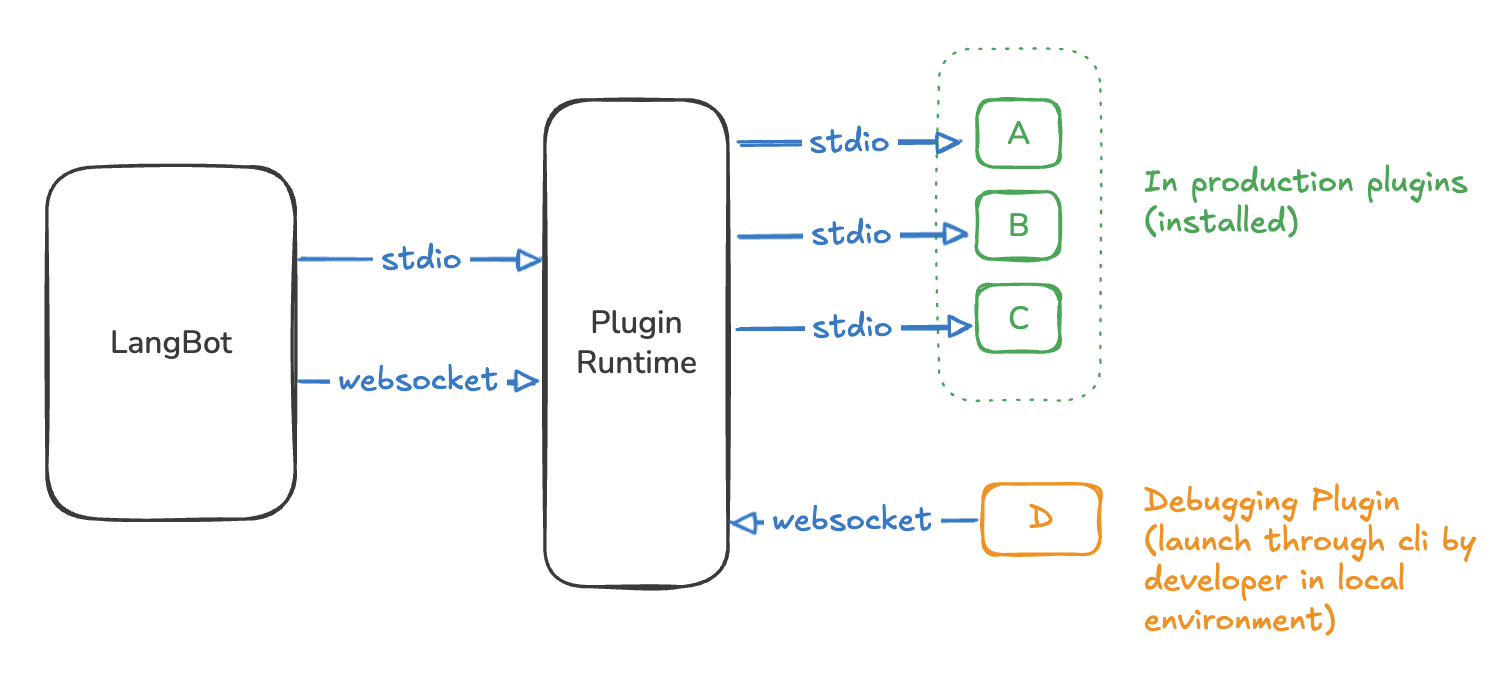
Plugins can provide the following components based on their specific functionality:
- Event Handlers: Listen to events while a bot processes messages and modify the context or processing flow.
- Commands: Triggered by user command messages starting with
!(or other configured prefixes). - Tools: Called by LLMs during execution of LangBot's built-in Local Agent.
- Knowledge Engines: Manage document indexing and retrieval for knowledge bases.
More component types will be supported for plugin implementation in the future.
Currently supports uploading plugin packages, installing from the plugin marketplace, and installing from GitHub Releases. In LangBot's plugin management page, click the top-right corner to choose the installation method.
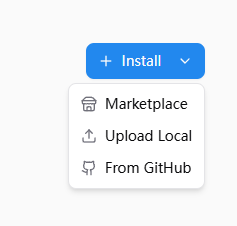
Click Upload Local, select .lbpkg files shared by others or downloaded from the Marketplace to install plugins. When installing via local upload or GitHub, if the plugin's declared LangBot version range is incompatible with your current version (or the declaration is invalid), a compatibility warning is shown and explicit confirmation is required before installation proceeds.
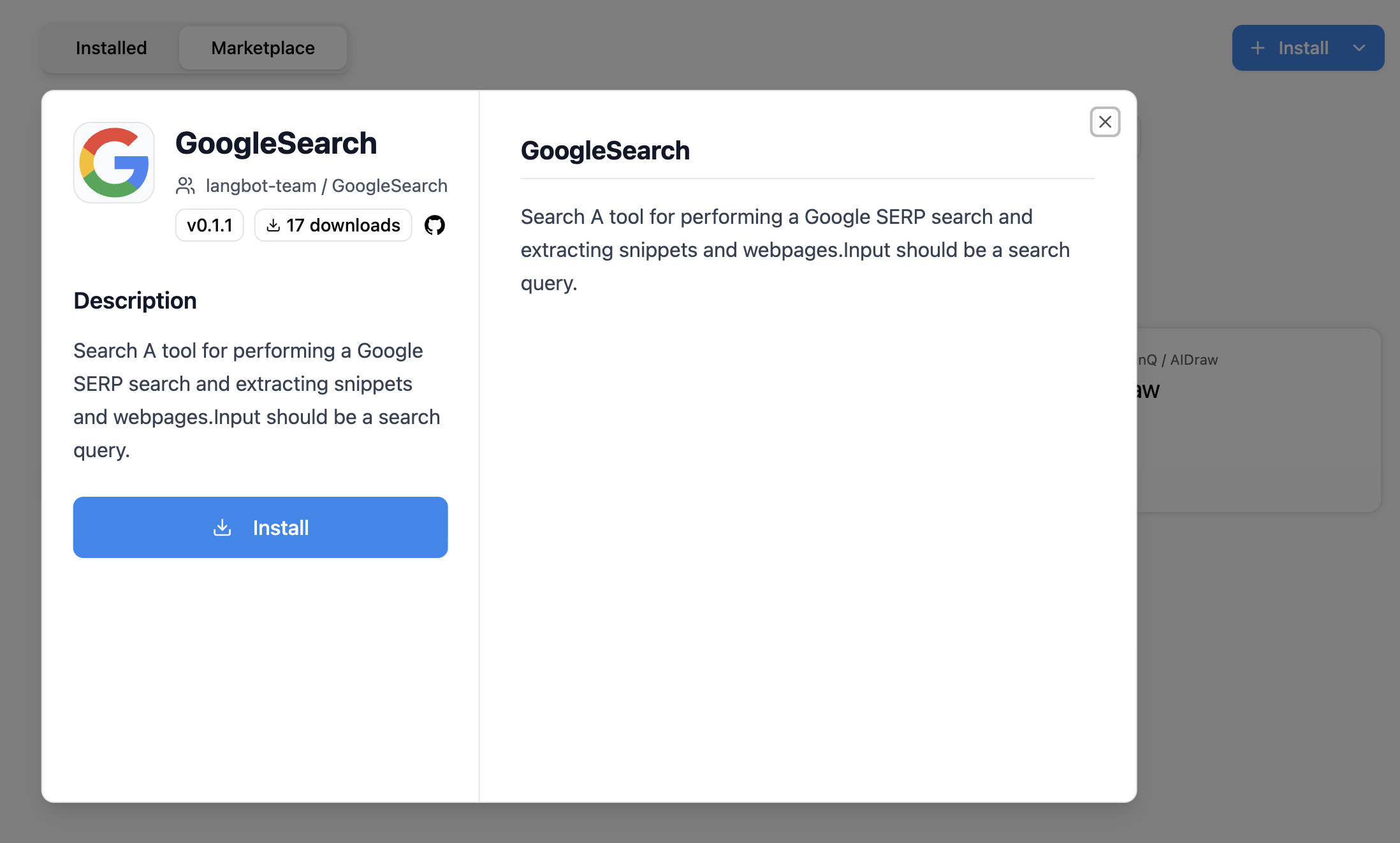
Or click the Plugin Marketplace tab, select a plugin, and click install. The marketplace only lists plugins that have at least one version compatible with your current LangBot version, and automatically installs the latest compatible version (preferring stable releases).
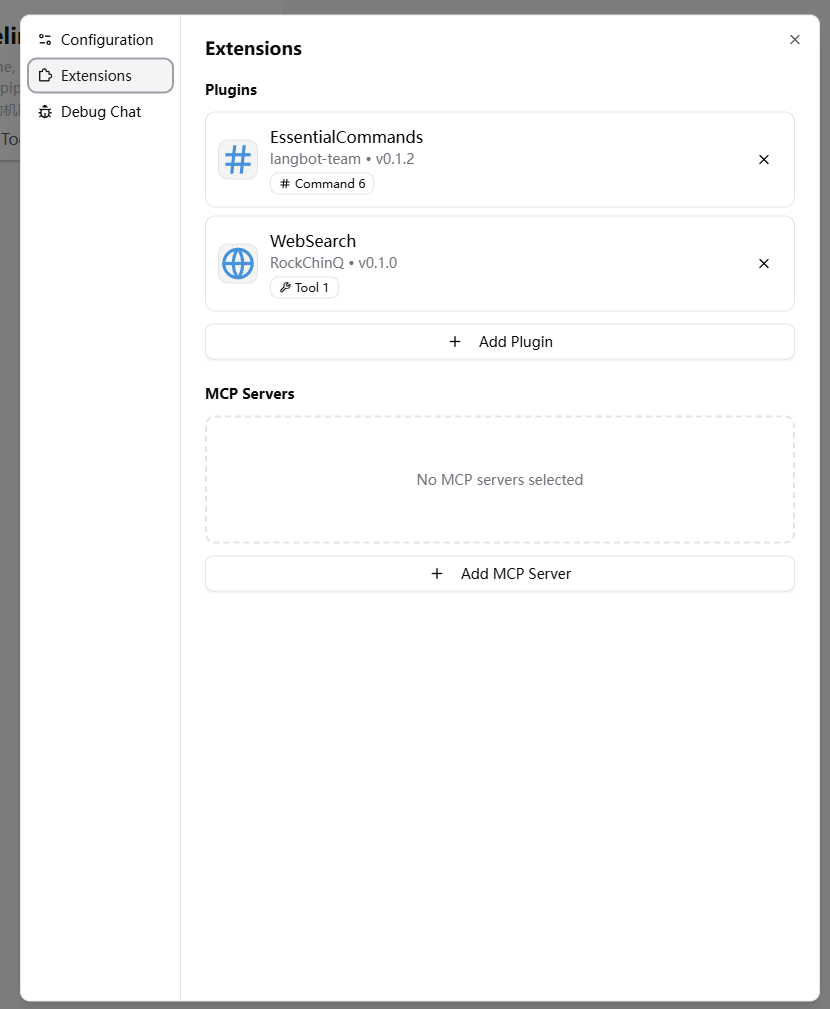
After installing plugins, you need to enable the plugin in the bot's Message policy tab.
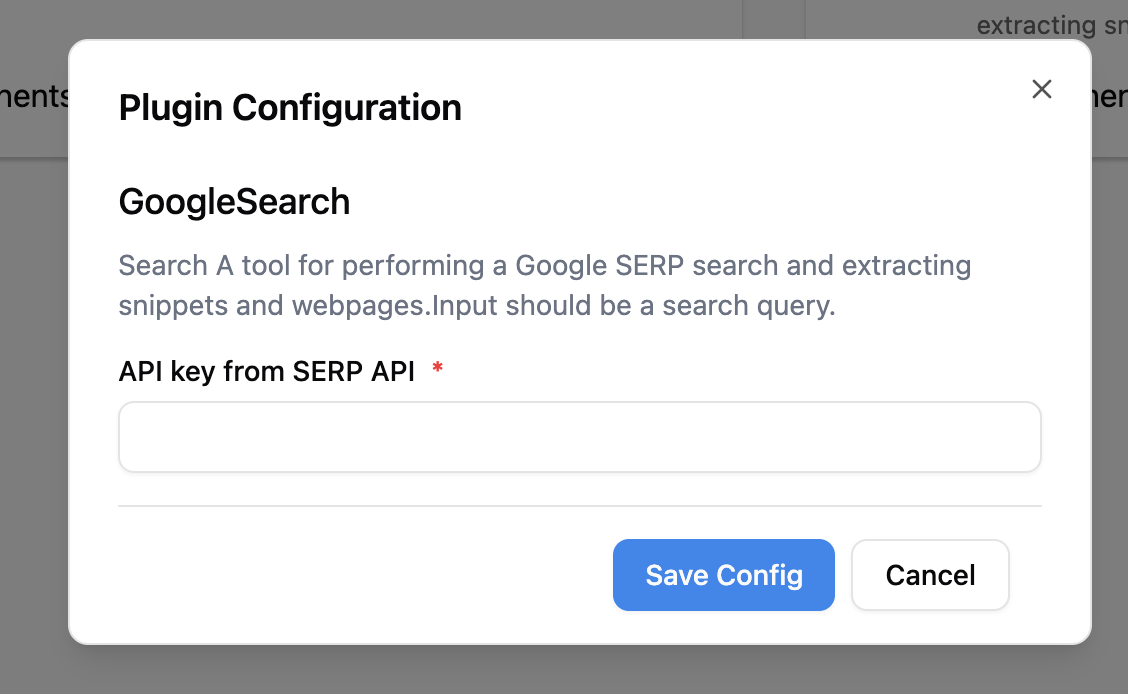
Some plugins may require you to fill in specific configuration items (please refer to the plugin README instructions). Click on the plugin card to enter the plugin details page and obtain and input the required information as prompted.
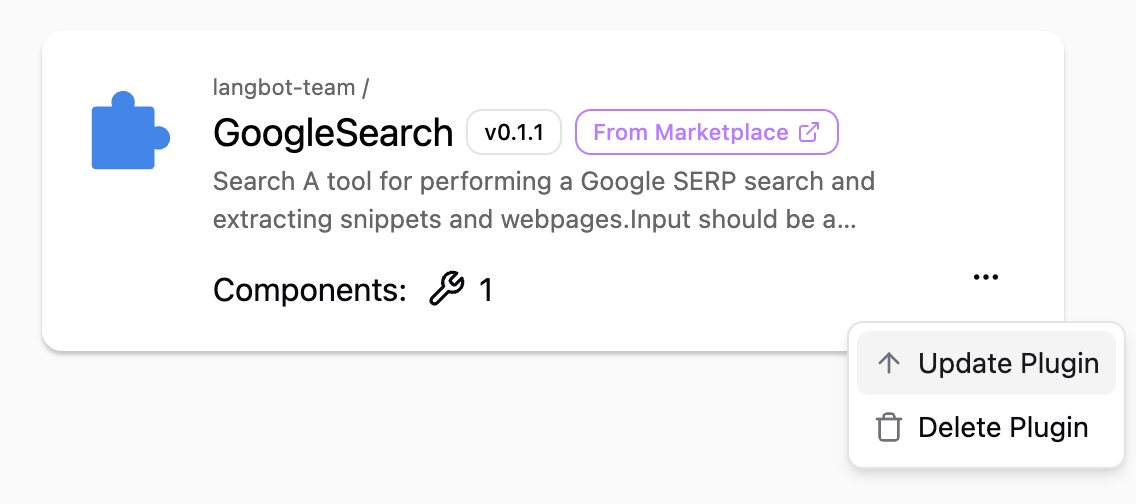
Only plugins installed from the plugin marketplace can be updated. The plugin detail page shows the installed version next to its title; when the marketplace has a newer compatible version, an "Update to vX.Y.Z" button appears at the top right of the detail page. You can also update from the plugin menu in the installed list (incompatible releases do not trigger update prompts).
If an already installed plugin becomes incompatible after you upgrade LangBot, only a warning is displayed—the plugin will not be automatically disabled.
The plugin marketplace can be accessed from LangBot's internal Plugin Management page, or you can visit the standalone site LangBot Plugin Marketplace.
Automatically synchronized from LangBot/docs.
简体中文
指南
- 快速开始
- 安装部署
- 配置机器人
- 配置 AI 能力
-
接入实例
- 接入实例
- Dify
- n8n
- Coze
- Langflow
-
DeepSeek
- 用 DeepSeek 搭建Telegram AI 机器人
- 用 DeepSeek 搭建Discord AI 机器人
- 用 DeepSeek 搭建Slack AI 机器人
- 用 DeepSeek 搭建飞书 AI 机器人
- 用 DeepSeek 搭建钉钉 AI 机器人
- 用 DeepSeek 搭建企业微信应用 AI 机器人
- 用 DeepSeek 搭建企业微信智能机器人 AI 机器人
- 用 DeepSeek 搭建微信客服 AI 机器人
- 用 DeepSeek 搭建微信公众号 AI 机器人
- 用 DeepSeek 搭建QQ 官方机器人 AI 机器人
- 用 DeepSeek 搭建LINE AI 机器人
- 用 DeepSeek 搭建KOOK AI 机器人
- 用 DeepSeek 搭建Mattermost AI 机器人
- 用 DeepSeek 搭建网页聊天挂件 AI 机器人
-
OpenAI (ChatGPT models)
- 用 OpenAI (ChatGPT models) 搭建Telegram AI 机器人
- 用 OpenAI (ChatGPT models) 搭建Discord AI 机器人
- 用 OpenAI (ChatGPT models) 搭建Slack AI 机器人
- 用 OpenAI (ChatGPT models) 搭建飞书 AI 机器人
- 用 OpenAI (ChatGPT models) 搭建钉钉 AI 机器人
- 用 OpenAI (ChatGPT models) 搭建企业微信应用 AI 机器人
- 用 OpenAI (ChatGPT models) 搭建企业微信智能机器人 AI 机器人
- 用 OpenAI (ChatGPT models) 搭建微信客服 AI 机器人
- 用 OpenAI (ChatGPT models) 搭建微信公众号 AI 机器人
- 用 OpenAI (ChatGPT models) 搭建QQ 官方机器人 AI 机器人
- 用 OpenAI (ChatGPT models) 搭建LINE AI 机器人
- 用 OpenAI (ChatGPT models) 搭建KOOK AI 机器人
- 用 OpenAI (ChatGPT models) 搭建Mattermost AI 机器人
- 用 OpenAI (ChatGPT models) 搭建网页聊天挂件 AI 机器人
-
Claude
- 用 Claude 搭建Telegram AI 机器人
- 用 Claude 搭建Discord AI 机器人
- 用 Claude 搭建Slack AI 机器人
- 用 Claude 搭建飞书 AI 机器人
- 用 Claude 搭建钉钉 AI 机器人
- 用 Claude 搭建企业微信应用 AI 机器人
- 用 Claude 搭建企业微信智能机器人 AI 机器人
- 用 Claude 搭建微信客服 AI 机器人
- 用 Claude 搭建微信公众号 AI 机器人
- 用 Claude 搭建QQ 官方机器人 AI 机器人
- 用 Claude 搭建LINE AI 机器人
- 用 Claude 搭建KOOK AI 机器人
- 用 Claude 搭建Mattermost AI 机器人
- 用 Claude 搭建网页聊天挂件 AI 机器人
-
Gemini
- 用 Gemini 搭建Telegram AI 机器人
- 用 Gemini 搭建Discord AI 机器人
- 用 Gemini 搭建Slack AI 机器人
- 用 Gemini 搭建飞书 AI 机器人
- 用 Gemini 搭建钉钉 AI 机器人
- 用 Gemini 搭建企业微信应用 AI 机器人
- 用 Gemini 搭建企业微信智能机器人 AI 机器人
- 用 Gemini 搭建微信客服 AI 机器人
- 用 Gemini 搭建微信公众号 AI 机器人
- 用 Gemini 搭建QQ 官方机器人 AI 机器人
- 用 Gemini 搭建LINE AI 机器人
- 用 Gemini 搭建KOOK AI 机器人
- 用 Gemini 搭建Mattermost AI 机器人
- 用 Gemini 搭建网页聊天挂件 AI 机器人
-
Qwen
- 用 Qwen 搭建Telegram AI 机器人
- 用 Qwen 搭建Discord AI 机器人
- 用 Qwen 搭建Slack AI 机器人
- 用 Qwen 搭建飞书 AI 机器人
- 用 Qwen 搭建钉钉 AI 机器人
- 用 Qwen 搭建企业微信应用 AI 机器人
- 用 Qwen 搭建企业微信智能机器人 AI 机器人
- 用 Qwen 搭建微信客服 AI 机器人
- 用 Qwen 搭建微信公众号 AI 机器人
- 用 Qwen 搭建QQ 官方机器人 AI 机器人
- 用 Qwen 搭建LINE AI 机器人
- 用 Qwen 搭建KOOK AI 机器人
- 用 Qwen 搭建Mattermost AI 机器人
- 用 Qwen 搭建网页聊天挂件 AI 机器人
-
Ollama
- 用 Ollama 搭建Telegram AI 机器人
- 用 Ollama 搭建Discord AI 机器人
- 用 Ollama 搭建Slack AI 机器人
- 用 Ollama 搭建飞书 AI 机器人
- 用 Ollama 搭建钉钉 AI 机器人
- 用 Ollama 搭建企业微信应用 AI 机器人
- 用 Ollama 搭建企业微信智能机器人 AI 机器人
- 用 Ollama 搭建微信客服 AI 机器人
- 用 Ollama 搭建微信公众号 AI 机器人
- 用 Ollama 搭建QQ 官方机器人 AI 机器人
- 用 Ollama 搭建LINE AI 机器人
- 用 Ollama 搭建KOOK AI 机器人
- 用 Ollama 搭建Mattermost AI 机器人
- 用 Ollama 搭建网页聊天挂件 AI 机器人
- 进阶运维
- 插件使用
- 企业支持
开发者
- 插件开发
- 插件 SDK API
- 核心开发
文章
- 浏览
- 产品动态
- 技术解析
-
教程与集成
- 在飞书里查询 GitHub 更新:Dify Workflow + GPT-6 Astra + LangBot 实战
- 让客服问题走对分支:Dify + LangBot 钉钉、企业微信机器人实战
- 把群公告交给 Dify:用 GPT-6 Astra 和 LangBot 搭建 QQ、飞书写作助手
- LangTARS:开源 AI Agent 远程控制电脑 — 支持接入 Dify 和 n8n 工作流
- 5分钟将 DeepSeek R1 接入微信、企业微信与 Discord (免费教程)
- 5 分钟部署你的 AI 机器人到 Discord、Telegram 和微信
- 终于让 Dify Agent 在 Discord、Telegram 和 Slack 上跑起来了
- 用 Langflow 拖拽式工作流构建多平台 AI 机器人
- 用 n8n 和 LangBot 构建多平台 AI 聊天机器人
- LangBot 4.6.0 外部知识库教程:集成 Dify 实现 RAG 对话
- Telegram:体验 LangBot 沙箱 Agent
- LangBot 公众号:体验基础 AI 问答
- 企业微信客服:体验 LangBot 知识库
- 公告
API 参考
- Service API
English
Guides
- Quick Start
- Installation
-
Configure Bots
- Bots
- Discord
- Telegram
- Slack
- Mattermost
- LINE
- Web Page Bot
- HTTP Bot
- KOOK
- Feishu
- DingTalk
- WeChat Official Account
- QQ (OneBot v11)
- Satori (QQ & Multi-Platform)
- QQ Official Bot
- WeCom (Enterprise WeChat)
- AI Configuration
-
Integration Recipes
- Integration Recipes
-
Dify
- Connect Dify to Telegram
- Connect Dify to Discord
- Connect Dify to Slack
- Connect Dify to Lark (Feishu)
- Connect Dify to DingTalk
- Connect Dify to WeCom (internal app)
- Connect Dify to WeCom Intelligent Bot
- Connect Dify to WeCom Customer Service
- Connect Dify to WeChat Official Account
- Connect Dify to QQ Official Bot
- Connect Dify to LINE
- Connect Dify to KOOK
- Connect Dify to Mattermost
- Connect Dify to a website chat widget
-
n8n
- Connect n8n to Telegram
- Connect n8n to Discord
- Connect n8n to Slack
- Connect n8n to Lark (Feishu)
- Connect n8n to DingTalk
- Connect n8n to WeCom (internal app)
- Connect n8n to WeCom Intelligent Bot
- Connect n8n to WeCom Customer Service
- Connect n8n to WeChat Official Account
- Connect n8n to QQ Official Bot
- Connect n8n to LINE
- Connect n8n to KOOK
- Connect n8n to Mattermost
- Connect n8n to a website chat widget
-
Coze
- Connect Coze to Telegram
- Connect Coze to Discord
- Connect Coze to Slack
- Connect Coze to Lark (Feishu)
- Connect Coze to DingTalk
- Connect Coze to WeCom (internal app)
- Connect Coze to WeCom Intelligent Bot
- Connect Coze to WeCom Customer Service
- Connect Coze to WeChat Official Account
- Connect Coze to QQ Official Bot
- Connect Coze to LINE
- Connect Coze to KOOK
- Connect Coze to Mattermost
- Connect Coze to a website chat widget
-
Langflow
- Connect Langflow to Telegram
- Connect Langflow to Discord
- Connect Langflow to Slack
- Connect Langflow to Lark (Feishu)
- Connect Langflow to DingTalk
- Connect Langflow to WeCom (internal app)
- Connect Langflow to WeCom Intelligent Bot
- Connect Langflow to WeCom Customer Service
- Connect Langflow to WeChat Official Account
- Connect Langflow to QQ Official Bot
- Connect Langflow to LINE
- Connect Langflow to KOOK
- Connect Langflow to Mattermost
- Connect Langflow to a website chat widget
-
DeepSeek
- Build a Telegram AI Bot with DeepSeek
- Build a Discord AI Bot with DeepSeek
- Build a Slack AI Bot with DeepSeek
- Build a Lark (Feishu) AI Bot with DeepSeek
- Build a DingTalk AI Bot with DeepSeek
- Build a WeCom (internal app) AI Bot with DeepSeek
- Build a WeCom Intelligent Bot AI Bot with DeepSeek
- Build a WeCom Customer Service AI Bot with DeepSeek
- Build a WeChat Official Account AI Bot with DeepSeek
- Build a QQ Official Bot AI Bot with DeepSeek
- Build a LINE AI Bot with DeepSeek
- Build a KOOK AI Bot with DeepSeek
- Build a Mattermost AI Bot with DeepSeek
- Build a a website chat widget AI Bot with DeepSeek
-
OpenAI (ChatGPT models)
- Build a Telegram AI Bot with OpenAI (ChatGPT models)
- Build a Discord AI Bot with OpenAI (ChatGPT models)
- Build a Slack AI Bot with OpenAI (ChatGPT models)
- Build a Lark (Feishu) AI Bot with OpenAI (ChatGPT models)
- Build a DingTalk AI Bot with OpenAI (ChatGPT models)
- Build a WeCom (internal app) AI Bot with OpenAI (ChatGPT models)
- Build a WeCom Intelligent Bot AI Bot with OpenAI (ChatGPT models)
- Build a WeCom Customer Service AI Bot with OpenAI (ChatGPT models)
- Build a WeChat Official Account AI Bot with OpenAI (ChatGPT models)
- Build a QQ Official Bot AI Bot with OpenAI (ChatGPT models)
- Build a LINE AI Bot with OpenAI (ChatGPT models)
- Build a KOOK AI Bot with OpenAI (ChatGPT models)
- Build a Mattermost AI Bot with OpenAI (ChatGPT models)
- Build a a website chat widget AI Bot with OpenAI (ChatGPT models)
-
Claude
- Build a Telegram AI Bot with Claude
- Build a Discord AI Bot with Claude
- Build a Slack AI Bot with Claude
- Build a Lark (Feishu) AI Bot with Claude
- Build a DingTalk AI Bot with Claude
- Build a WeCom (internal app) AI Bot with Claude
- Build a WeCom Intelligent Bot AI Bot with Claude
- Build a WeCom Customer Service AI Bot with Claude
- Build a WeChat Official Account AI Bot with Claude
- Build a QQ Official Bot AI Bot with Claude
- Build a LINE AI Bot with Claude
- Build a KOOK AI Bot with Claude
- Build a Mattermost AI Bot with Claude
- Build a a website chat widget AI Bot with Claude
-
Gemini
- Build a Telegram AI Bot with Gemini
- Build a Discord AI Bot with Gemini
- Build a Slack AI Bot with Gemini
- Build a Lark (Feishu) AI Bot with Gemini
- Build a DingTalk AI Bot with Gemini
- Build a WeCom (internal app) AI Bot with Gemini
- Build a WeCom Intelligent Bot AI Bot with Gemini
- Build a WeCom Customer Service AI Bot with Gemini
- Build a WeChat Official Account AI Bot with Gemini
- Build a QQ Official Bot AI Bot with Gemini
- Build a LINE AI Bot with Gemini
- Build a KOOK AI Bot with Gemini
- Build a Mattermost AI Bot with Gemini
- Build a a website chat widget AI Bot with Gemini
-
Qwen
- Build a Telegram AI Bot with Qwen
- Build a Discord AI Bot with Qwen
- Build a Slack AI Bot with Qwen
- Build a Lark (Feishu) AI Bot with Qwen
- Build a DingTalk AI Bot with Qwen
- Build a WeCom (internal app) AI Bot with Qwen
- Build a WeCom Intelligent Bot AI Bot with Qwen
- Build a WeCom Customer Service AI Bot with Qwen
- Build a WeChat Official Account AI Bot with Qwen
- Build a QQ Official Bot AI Bot with Qwen
- Build a LINE AI Bot with Qwen
- Build a KOOK AI Bot with Qwen
- Build a Mattermost AI Bot with Qwen
- Build a a website chat widget AI Bot with Qwen
-
Ollama
- Build a Telegram AI Bot with Ollama
- Build a Discord AI Bot with Ollama
- Build a Slack AI Bot with Ollama
- Build a Lark (Feishu) AI Bot with Ollama
- Build a DingTalk AI Bot with Ollama
- Build a WeCom (internal app) AI Bot with Ollama
- Build a WeCom Intelligent Bot AI Bot with Ollama
- Build a WeCom Customer Service AI Bot with Ollama
- Build a WeChat Official Account AI Bot with Ollama
- Build a QQ Official Bot AI Bot with Ollama
- Build a LINE AI Bot with Ollama
- Build a KOOK AI Bot with Ollama
- Build a Mattermost AI Bot with Ollama
- Build a a website chat widget AI Bot with Ollama
- Advanced Operations
- Using Plugins
- Enterprise support
Developers
- Plugin Development
- Plugin SDK API
- Core Development
Articles
- Browse
- Product Updates
- Engineering
-
Tutorials & Integrations
- Turn GitHub Releases into Telegram Briefings with Dify and LangBot
- Route Support Questions in Discord and LINE with Dify and LangBot
- A Dify Writing Assistant for Discord and Telegram with GPT-6 Astra and LangBot
- LangTARS: Open-Source AI Agent for Remote PC Control — Works with Dify, n8n & 10+ Messaging Platforms
- How to Connect DeepSeek R1 to WeChat, Discord & Telegram in 5 Minutes (FREE)
- Deploy Your Own AI Bot to Discord, Telegram & WeChat in 5 Minutes
- Finally Got My Dify Agent Working in Discord, Telegram and Slack
- How I Built a Multi-Platform AI Bot with Langflow's Drag-and-Drop Workflows
- How I Built a Multi-Platform AI Chatbot with n8n and LangBot
- LangBot 4.6.0 External Knowledge Base Tutorial: Integrating Dify with LangBot for RAG-powered Conversations
- Announcements
API Reference
- Service API
Other pages
日本語
ガイド
- クイックスタート
- インストール
- ボットを設定
- AI 設定
-
連携レシピ
- 連携レシピ
-
Dify
- Dify を Telegram に接続する
- Dify を Discord に接続する
- Dify を Slack に接続する
- Dify を Lark(Feishu) に接続する
- Dify を DingTalk に接続する
- Dify を WeCom(社内アプリ) に接続する
- Dify を WeCom インテリジェントボット に接続する
- Dify を WeCom カスタマーサービス に接続する
- Dify を WeChat 公式アカウント に接続する
- Dify を QQ 公式ボット に接続する
- Dify を LINE に接続する
- Dify を KOOK に接続する
- Dify を Mattermost に接続する
- Dify を Web サイトのチャットウィジェット に接続する
-
n8n
- n8n を Telegram に接続する
- n8n を Discord に接続する
- n8n を Slack に接続する
- n8n を Lark(Feishu) に接続する
- n8n を DingTalk に接続する
- n8n を WeCom(社内アプリ) に接続する
- n8n を WeCom インテリジェントボット に接続する
- n8n を WeCom カスタマーサービス に接続する
- n8n を WeChat 公式アカウント に接続する
- n8n を QQ 公式ボット に接続する
- n8n を LINE に接続する
- n8n を KOOK に接続する
- n8n を Mattermost に接続する
- n8n を Web サイトのチャットウィジェット に接続する
-
Coze
- Coze を Telegram に接続する
- Coze を Discord に接続する
- Coze を Slack に接続する
- Coze を Lark(Feishu) に接続する
- Coze を DingTalk に接続する
- Coze を WeCom(社内アプリ) に接続する
- Coze を WeCom インテリジェントボット に接続する
- Coze を WeCom カスタマーサービス に接続する
- Coze を WeChat 公式アカウント に接続する
- Coze を QQ 公式ボット に接続する
- Coze を LINE に接続する
- Coze を KOOK に接続する
- Coze を Mattermost に接続する
- Coze を Web サイトのチャットウィジェット に接続する
-
Langflow
- Langflow を Telegram に接続する
- Langflow を Discord に接続する
- Langflow を Slack に接続する
- Langflow を Lark(Feishu) に接続する
- Langflow を DingTalk に接続する
- Langflow を WeCom(社内アプリ) に接続する
- Langflow を WeCom インテリジェントボット に接続する
- Langflow を WeCom カスタマーサービス に接続する
- Langflow を WeChat 公式アカウント に接続する
- Langflow を QQ 公式ボット に接続する
- Langflow を LINE に接続する
- Langflow を KOOK に接続する
- Langflow を Mattermost に接続する
- Langflow を Web サイトのチャットウィジェット に接続する
-
DeepSeek
- DeepSeek で Telegram の AI ボットを作る
- DeepSeek で Discord の AI ボットを作る
- DeepSeek で Slack の AI ボットを作る
- DeepSeek で Lark(Feishu) の AI ボットを作る
- DeepSeek で DingTalk の AI ボットを作る
- DeepSeek で WeCom(社内アプリ) の AI ボットを作る
- DeepSeek で WeCom インテリジェントボット の AI ボットを作る
- DeepSeek で WeCom カスタマーサービス の AI ボットを作る
- DeepSeek で WeChat 公式アカウント の AI ボットを作る
- DeepSeek で QQ 公式ボット の AI ボットを作る
- DeepSeek で LINE の AI ボットを作る
- DeepSeek で KOOK の AI ボットを作る
- DeepSeek で Mattermost の AI ボットを作る
- DeepSeek で Web サイトのチャットウィジェット の AI ボットを作る
-
OpenAI (ChatGPT models)
- OpenAI (ChatGPT models) で Telegram の AI ボットを作る
- OpenAI (ChatGPT models) で Discord の AI ボットを作る
- OpenAI (ChatGPT models) で Slack の AI ボットを作る
- OpenAI (ChatGPT models) で Lark(Feishu) の AI ボットを作る
- OpenAI (ChatGPT models) で DingTalk の AI ボットを作る
- OpenAI (ChatGPT models) で WeCom(社内アプリ) の AI ボットを作る
- OpenAI (ChatGPT models) で WeCom インテリジェントボット の AI ボットを作る
- OpenAI (ChatGPT models) で WeCom カスタマーサービス の AI ボットを作る
- OpenAI (ChatGPT models) で WeChat 公式アカウント の AI ボットを作る
- OpenAI (ChatGPT models) で QQ 公式ボット の AI ボットを作る
- OpenAI (ChatGPT models) で LINE の AI ボットを作る
- OpenAI (ChatGPT models) で KOOK の AI ボットを作る
- OpenAI (ChatGPT models) で Mattermost の AI ボットを作る
- OpenAI (ChatGPT models) で Web サイトのチャットウィジェット の AI ボットを作る
-
Claude
- Claude で Telegram の AI ボットを作る
- Claude で Discord の AI ボットを作る
- Claude で Slack の AI ボットを作る
- Claude で Lark(Feishu) の AI ボットを作る
- Claude で DingTalk の AI ボットを作る
- Claude で WeCom(社内アプリ) の AI ボットを作る
- Claude で WeCom インテリジェントボット の AI ボットを作る
- Claude で WeCom カスタマーサービス の AI ボットを作る
- Claude で WeChat 公式アカウント の AI ボットを作る
- Claude で QQ 公式ボット の AI ボットを作る
- Claude で LINE の AI ボットを作る
- Claude で KOOK の AI ボットを作る
- Claude で Mattermost の AI ボットを作る
- Claude で Web サイトのチャットウィジェット の AI ボットを作る
-
Gemini
- Gemini で Telegram の AI ボットを作る
- Gemini で Discord の AI ボットを作る
- Gemini で Slack の AI ボットを作る
- Gemini で Lark(Feishu) の AI ボットを作る
- Gemini で DingTalk の AI ボットを作る
- Gemini で WeCom(社内アプリ) の AI ボットを作る
- Gemini で WeCom インテリジェントボット の AI ボットを作る
- Gemini で WeCom カスタマーサービス の AI ボットを作る
- Gemini で WeChat 公式アカウント の AI ボットを作る
- Gemini で QQ 公式ボット の AI ボットを作る
- Gemini で LINE の AI ボットを作る
- Gemini で KOOK の AI ボットを作る
- Gemini で Mattermost の AI ボットを作る
- Gemini で Web サイトのチャットウィジェット の AI ボットを作る
-
Qwen
- Qwen で Telegram の AI ボットを作る
- Qwen で Discord の AI ボットを作る
- Qwen で Slack の AI ボットを作る
- Qwen で Lark(Feishu) の AI ボットを作る
- Qwen で DingTalk の AI ボットを作る
- Qwen で WeCom(社内アプリ) の AI ボットを作る
- Qwen で WeCom インテリジェントボット の AI ボットを作る
- Qwen で WeCom カスタマーサービス の AI ボットを作る
- Qwen で WeChat 公式アカウント の AI ボットを作る
- Qwen で QQ 公式ボット の AI ボットを作る
- Qwen で LINE の AI ボットを作る
- Qwen で KOOK の AI ボットを作る
- Qwen で Mattermost の AI ボットを作る
- Qwen で Web サイトのチャットウィジェット の AI ボットを作る
-
Ollama
- Ollama で Telegram の AI ボットを作る
- Ollama で Discord の AI ボットを作る
- Ollama で Slack の AI ボットを作る
- Ollama で Lark(Feishu) の AI ボットを作る
- Ollama で DingTalk の AI ボットを作る
- Ollama で WeCom(社内アプリ) の AI ボットを作る
- Ollama で WeCom インテリジェントボット の AI ボットを作る
- Ollama で WeCom カスタマーサービス の AI ボットを作る
- Ollama で WeChat 公式アカウント の AI ボットを作る
- Ollama で QQ 公式ボット の AI ボットを作る
- Ollama で LINE の AI ボットを作る
- Ollama で KOOK の AI ボットを作る
- Ollama で Mattermost の AI ボットを作る
- Ollama で Web サイトのチャットウィジェット の AI ボットを作る
- 運用ガイド
- プラグインの利用
- 企業サポート
開発者
- プラグイン開発
- プラグイン SDK API
- コア開発
記事
- 一覧
- 製品アップデート
- エンジニアリング
-
チュートリアルと連携
- Turn GitHub Releases into Telegram Briefings with Dify and LangBot
- Route Support Questions in Discord and LINE with Dify and LangBot
- A Dify Writing Assistant for Discord and Telegram with GPT-6 Astra and LangBot
- LangTARS:Dify・n8n と連携するオープンソース PC 操作 Agent
- DeepSeek R1 を WeChat・Discord・Telegram に5分で接続する方法
- AI Bot を Discord・Telegram・WeChat に5分でデプロイ
- Dify Agent を Discord・Telegram・Slack で動かす
- Langflow のドラッグ&ドロップでマルチプラットフォーム AI Bot を構築
- n8n と LangBot でマルチプラットフォーム AI Chatbot を構築
- LangBot 4.6.0 外部ナレッジベース入門:Dify と連携した RAG 会話
- お知らせ
API リファレンス
- Service API